
AI Automation 101: Automate Your Repetitive Work in a Weekend (With a Claude Skill)
The beginner's guide to AI automation — build a Claude skill that does one weekly chore your way, then put it on a schedule.

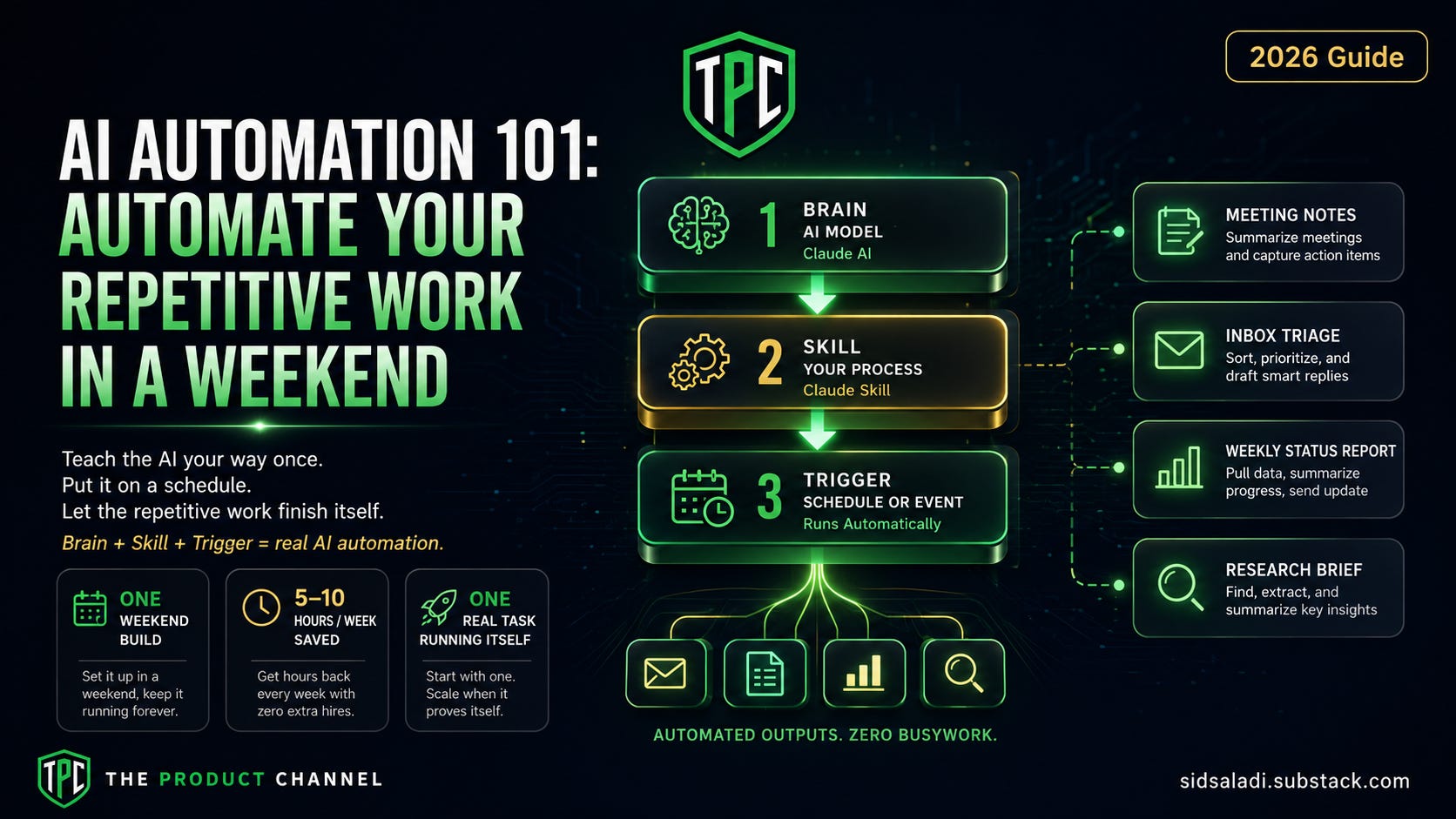
Add up the hours: the weekly status report, the meeting notes, the inbox triage, the same five questions answered the same five ways. For most knowledge workers that's 5–10 hours a week of work a machine should be doing — not because the work is easy, but because it's repetitive.
Here's the trap everyone falls into: they hear "AI automation" and go shopping for automation platforms. Zapier plans, workflow builders, enterprise suites. Two weeks later they've automated nothing and subscribed to everything.
This guide takes the opposite path, and it's the thesis I'll repeat until it sticks: don't automate the platform way — automate the skill way. Teach the AI your way of doing ONE task, then put it on a schedule. That's the whole method. It costs almost nothing, takes a weekend, and it compounds.
By Sunday night you'll have one real task running itself. Let's build.

What Is AI Automation, Actually? (The 3 Layers)
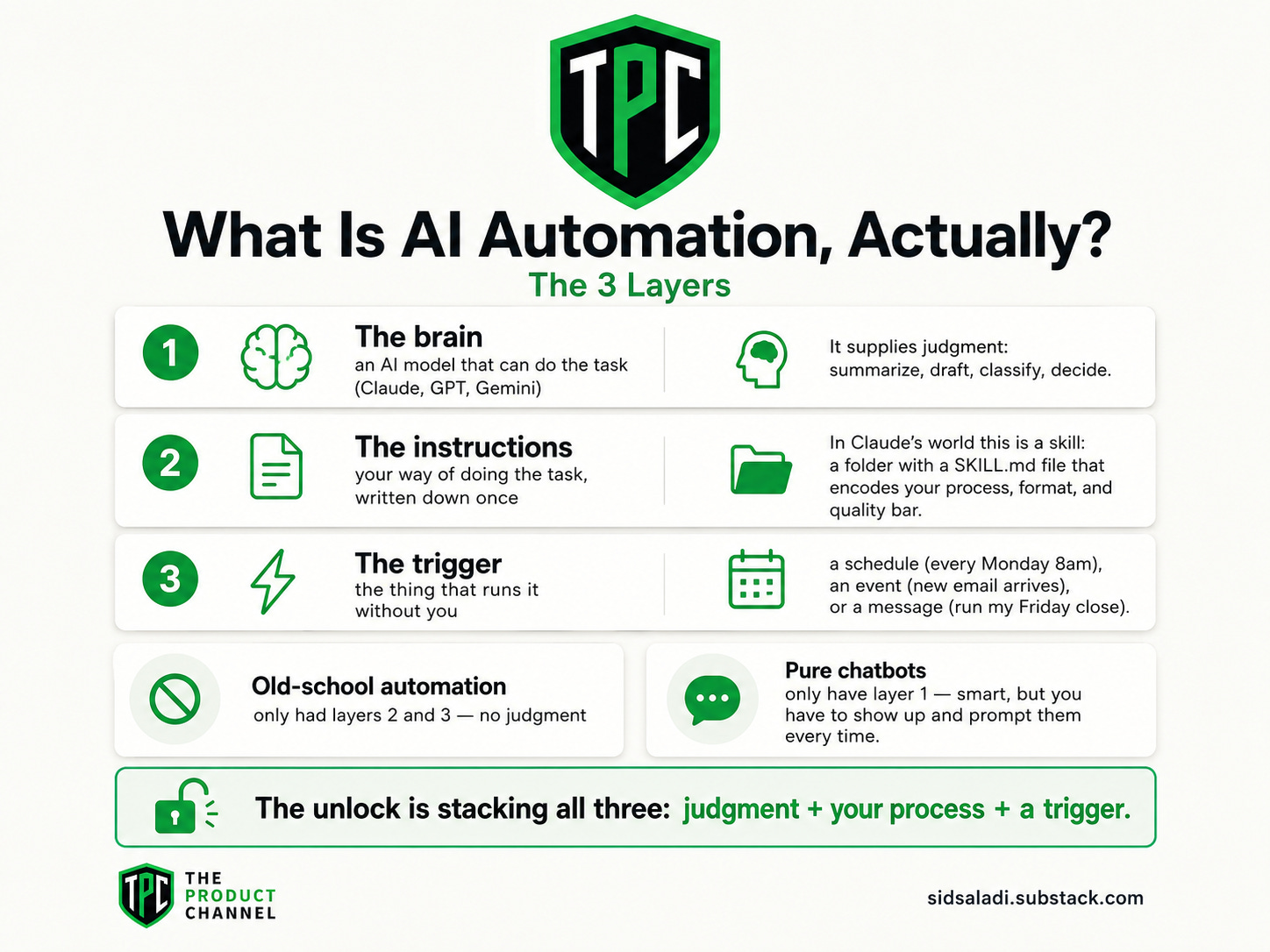
Strip the buzzword and AI automation is three layers stacked:
The brain — an AI model that can do the task (Claude, GPT, Gemini). It supplies judgment: summarize, draft, classify, decide.
The instructions — your way of doing the task, written down once. In Claude's world this is a skill: a folder with a
SKILL.mdfile that encodes your process, format, and quality bar.The trigger — the thing that runs it without you: a schedule (every Monday 8am), an event (new email arrives), or a message ("run my Friday close").
Old-school automation (rules, macros, classic Zapier zaps) only had layers 2 and 3 — no judgment, so it broke the moment reality got messy. Pure chatbots only have layer 1 — smart, but you have to show up and prompt them every time.
The unlock is stacking all three: judgment + your process + a trigger. That's when work starts finishing itself.
Who This Guide Is For
The everyday AI user drowning in recurring chores — meetings, email, reports. You need Level 1–2 and one good skill; that's the whole prescription.
The product manager whose week is transcripts, specs, and status updates. Automation gives you back the hours the calendar stole — start with meetings, chain into status reports.
The founder who is the ops department. Standing briefs and self-triaging intake are the closest thing to a first hire that costs $20/month.
The business professional (marketing, sales, finance) with a weekly deliverable that has the same shape every week. If you can describe the shape, you can automate the deliverable.
No coding background required for anything before Level 3 — if you can write a clear checklist, you can build a skill.
What Should You Automate First? (The Picker)
Not everything deserves automation. The first task should score high on all three:
Recurring — happens weekly or more. Automating a once-a-quarter task is a hobby, not a win.
Same shape every time — inputs arrive in a similar form (a transcript, an inbox, a folder of files, a spreadsheet).
Judgment-light but annoying — needs some intelligence (summarize, classify, draft) but not your strategic brain.
The classic first wins, in rough order of payoff:
Meeting transcripts → decisions & action items (the single best starter)
Inbox triage — sort, flag the urgent two, draft routine replies
The weekly status report — gathered from notes and trackers you already keep
Intake classification — support requests, feedback, leads, tagged and routed
Research briefs — "before every call, a one-pager on who I'm meeting"
Content repurposing — every published piece becomes three social drafts, automatically
Weekly metrics digests — the numbers you check daily, delivered as one Monday brief instead
For example: if you run five meetings a week and spend 20 minutes post-processing each, the meeting-notes automation alone returns ~85 hours a year. That's two working weeks, from the easiest item on the list.
💡 Pro tip: automate a task you currently do badly but must do — the guilt-chores. The quality bar is low, the relief is high, and nobody misses your manual version.
The Weekend Build: One Task, Start to Finish
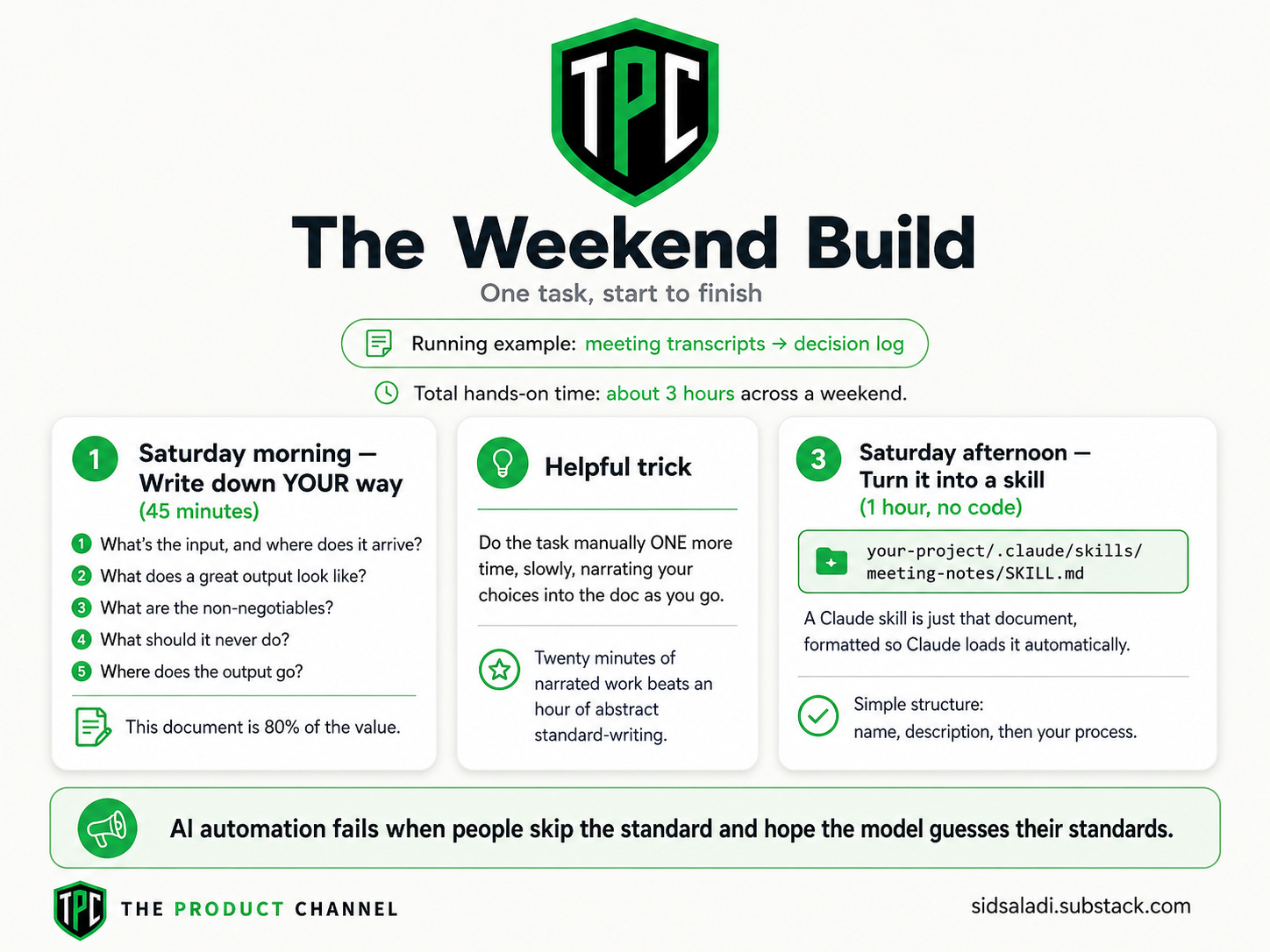
Here's the full method as a workshop. Total hands-on time: about 3 hours across a weekend. We'll use "meeting transcripts → decision log" as the running example — swap in your task everywhere.
Saturday morning — Write down YOUR way (45 minutes)
Before any AI touches anything, capture how you do the task when you do it well. Answer five questions in a doc:
What's the input, and where does it arrive? (transcripts, in a folder / pasted)
What does a great output look like? (find your best past example — this matters more than any prompt trick)
What are the non-negotiables? (every decision has an owner; questions never get dropped; names spelled right)
What should it never do? (invent attendees, soften disagreements, exceed one page)
Where does the output go? (a Notion page, an email, a doc)
This document is 80% of the value. AI automation fails when people skip it and hope the model guesses their standards.
A trick that makes this step painless: don't write the standard from memory — do the task manually ONE more time, slowly, narrating your choices into the doc as you go. "I always check who owns this… I never trust the stated deadline… I flag anything involving the client." Twenty minutes of narrated work beats an hour of abstract standard-writing, and the rules come out in enforceable language because they came from enforcement.
Saturday afternoon — Turn it into a skill (1 hour, no code)
A Claude skill is just that document, formatted so Claude loads it automatically. The structure:
your-project/.claude/skills/meeting-notes/SKILL.md
And the SKILL.md itself follows a simple shape — name, description, then your process:
---
name: meeting-notes
description: Turn raw meeting transcripts into a structured decision log
  with owners, action items, and open questions. Use whenever the user
  provides a transcript or asks to process meetings.
---

Process every transcript into EXACTLY this structure:

## Decisions
- [decision] — OWNER: [name] — DATE: [meeting date]

## Action items
- [action] — OWNER: [name] — DUE: [date or "unset"]

## Open questions
- [question raised but never answered]

Rules:
- Every decision and action MUST have an owner. If unclear, write
  "OWNER: ⚠️ unassigned" — never guess.
- Never invent or paraphrase names — copy them exactly.
- If people disagreed, record the disagreement in one neutral line.
- One page maximum. Cut small talk, keep every commitment.
That's a real, working skill — instructions, not code. Don't want to write one from scratch? Two shortcuts:
Install mine: the Meeting Notes skill and Email Triage skill are free, ready-made versions of the two best starter automations.
Generate yours: use the Automation Skill Builder prompt below — it interviews you and drafts the SKILL.md for you.
Saturday evening — Test on real inputs (30 minutes)
Run it on three real past inputs — including your messiest one (the meeting where everyone talked over each other). Compare against your best manual output. Where it falls short, don't re-prompt — edit the SKILL.md rule that failed. For instance: if it guessed an owner, you didn't write the "never guess" rule strongly enough.
This edit-the-instructions loop is the entire craft. Three rounds gets most skills to "better than me on a tired Thursday."
Sunday — Add the trigger (45 minutes)
Now make it run without you. Three levels — start at the one matching your comfort:
A quick word on why the trigger matters more than it looks: a skill without a trigger is a better tool; a skill WITH a trigger is a smaller job description. The first still costs you the remembering — and remembering is the tax that makes chores feel heavy. When the Friday log simply exists every Friday, the mental load disappears along with the typing time. People consistently report the relief is bigger than the hours.
Level 1 — The calendar nudge (zero setup): a recurring reminder that says "paste the week's transcripts into Claude." The skill does the work; you're just the delivery person. Honest and effective.
Level 2 — Scheduled tasks (the real unlock): Claude Code and tools like it can run a prompt on a schedule — "every Friday at 4pm, process everything in the transcripts folder and write the decision log." On a Mac, a one-line cron entry does it; no server, no platform. This is the level where work starts finishing itself.
What a Level-2 setup concretely looks like: your skill lives in .claude/skills/, a one-line schedule entry runs the task at a fixed time, and the output lands in the same place every run — a dated page, a doc, an email to yourself. When something breaks (a moved folder, an expired login), the run fails visibly instead of silently, which is exactly what you want. Set it up once on a Sunday; touch it again only when your process changes.
Level 3 — The always-on agent: an agent gateway like OpenClaw sits behind your WhatsApp/Telegram and runs standing instructions — "every weekday 8am, brief me on X." My OpenClaw setup guide is the full walkthrough when you're ready.
By Sunday night: one task, running on a trigger, doing it your way. That's AI automation — the rest is repetition.
The Automation Skill Builder (Copy-Paste)
The prompt that turns your Saturday-morning answers into a finished skill file — it interviews you first, then writes the SKILL.md:
The Automation Skill Builder — Interview Me, Then Write My SKILL.md — Answers five questions about a repetitive task, then generates a complete, ready-to-install Claude SKILL.md that automates it your way — with quality rules, edge cases, and a test plan.
You are an automation architect. Your job: turn ONE of my repetitive tasks into a complete Claude skill (a SKILL.md instruction file). Interview first, write second.

STEP 1 — Interview me (ask all five, wait for my answers):
1. What's the recurring task, and how often does it happen?
2. What does the input look like, and where does it arrive?
3. Show me (or describe) your best-ever manual output — what made it good?
4. What are the hard rules? (things it must ALWAYS do / NEVER do)
5. Where should the output go, and who reads it?

STEP 2 — Write the skill. Produce a complete SKILL.md:
- YAML frontmatter: kebab-case name + a description that tells Claude
  exactly WHEN to auto-load this skill.
- The output structure as an explicit template (headings, fields, order).
- My hard rules as numbered, enforceable statements — including what to
  do when information is missing (flag it, never invent it).
- Length/format limits, and the tone if writing is involved.

STEP 3 — Pressure-test it. Give me:
- The 3 messiest realistic inputs this skill will face, and how the rules
  handle each.
- One rule you think I'm MISSING based on my answers — propose it.
- A 3-input test plan for my first real run.

Format everything so I can copy the SKILL.md straight into
.claude/skills/[name]/SKILL.md and run the test plan today.
👉 Save this prompt to your library on GetPrompts →
💡 Pro tip: run it once per automation, not once ever — the interview answers are different for each task, and the skill quality lives in those answers.
The Automation Menu: Ideas by Persona (With the Skill for Each)
Keep reading with a 7-day free trial
Subscribe to The Product Channel By Sid Saladi to keep reading this post and get 7 days of free access to the full post archives.