
Claude Code Memory 101: How to Make Your AI Agent Remember Everything latest

Every new Claude Code session starts from zero. You open your terminal, launch Claude Code, and immediately spend 10 minutes re-explaining your project. The tech stack. The file structure. The coding conventions. The thing you fixed yesterday that it already forgot.
You’ve been here before. Maybe you’ve even built a workaround — a Google Doc with context you paste in, or a CLAUDE.md file with the basics. But it still feels like talking to someone with amnesia. Every. Single. Session.
Here’s the thing: Claude Code now has a real memory system. Multiple layers of it, actually. But most people either don’t know it exists, use only 10% of it, or set it up wrong.
Today I’m going to break down the complete memory system — what Claude Code gives you natively, what’s still missing, and how to build a memory architecture that makes Claude Code feel like it actually knows your project. I’ve been running a 12-agent Team OS on top of Claude Code for months — handling PR reviews, standups, docs, bug triage, and sprint reporting — and the memory layer is what made it all work.
By the end of this guide, you’ll have a working memory system set up in under 10 minutes. And 5 complete architectures you can copy depending on whether you’re a solo developer, managing multiple projects, running an agent system, or working on a team.
The Product Channel by Sid Saladi is a reader-supported publication. To receive new posts and support my work, consider becoming a free or paid subscriber.
PART 1: THE 101 GUIDE
Section 1: The Problem — Claude Code Forgets Everything
Let me paint the picture.
You’re building a Next.js app. You’ve been working with Claude Code for three days. It knows your folder structure, your API patterns, your testing setup, your deployment pipeline. It’s been writing solid code all afternoon.
You close the terminal. Go to bed. Open Claude Code the next morning.
It has no idea who you are.
“Can you show me the project structure?” you ask. It runs ls. Like it’s the first day. You explain the app uses Supabase, not Firebase. You remind it about the custom hooks folder. You re-describe the naming conventions. Fifteen minutes gone before you write a single line of code.
This is the context loss problem. And it’s the biggest gap between Claude Code and a human collaborator.
Why Claude Code Is Different From Regular Claude
If you use Claude on claude.ai, you’ve probably noticed it remembers things between conversations. Your name. Your job. Your preferences. That’s because Claude has Projects and conversation memory — built-in systems that persist context.
Claude Code doesn’t work the same way.
Claude Code runs in your terminal. Each session gets a fresh context window. When you close it, everything in that context window disappears. There’s no built-in conversation memory carrying over your preferences from last Tuesday.
This is by design. Claude Code is optimized for deep, focused coding sessions — not long-running conversations. But it creates a real pain point for anyone who uses it regularly.
What CLAUDE.md Solves (And What It Doesn’t)
You probably already know about CLAUDE.md. It’s a markdown file in your project root that Claude Code reads at the start of every session. You put your project rules, build commands, architecture notes, and conventions in there.
CLAUDE.md is a great start. But it’s static configuration. You write it once and manually update it. It doesn’t learn. It doesn’t capture what happened in your last session. It doesn’t adapt when you correct Claude’s behavior.
Think of it this way: CLAUDE.md is like a job description. Memory is like the employee’s notebook. You need both.
The Real Cost of No Memory
I tracked it. Here’s what context loss actually costs:
10-15 minutes per session re-establishing context (across hundreds of developers I’ve talked to, this is the consistent number)
Inconsistent behavior — Claude applies your conventions perfectly in one session, then forgets them the next
Lost learnings — you correct Claude on a pattern, it fixes it, and then makes the same mistake tomorrow
Repeated debugging — Claude re-discovers the same gotchas you already solved together
If you’re using Claude Code daily, that’s 5+ hours per month just repeating yourself. At a $200/month Max subscription, you’re paying for amnesia.
Section 2: The 4 Types of Memory for AI Coding Agents
Not all memory is the same. Before we get into setup, let’s understand what types of memory exist and what each one does.
Type 1: Static Configuration
What it is: Files that define your project rules, conventions, and architecture. Written by you, read by Claude at startup.
Examples: CLAUDE.md, .claude/rules/ files, README.md
Analogy: The employee handbook. Everyone reads it on day one. It tells you the rules. But it doesn’t change based on what you do.
Strengths: Shared across team, version controlled, explicit Weaknesses: Doesn’t learn, requires manual updates, no personalization
Type 2: Session Memory
What it is: Everything Claude learns during a single conversation. File contents it read, commands it ran, decisions you made together.
Examples: Claude Code’s in-session context window
Analogy: Short-term working memory. Everything you discussed today.
Strengths: Rich, detailed, captures nuance Weaknesses: Gone when you close the terminal. Zero persistence.
Type 3: Persistent Memory
What it is: Knowledge that survives across sessions. Things Claude learned about your project, your preferences, your patterns — saved to files that get loaded next time.
Examples: Auto memory notes, custom memory files, ~/.claude/projects/ directory
Analogy: The employee’s personal notebook. “Boss prefers tabs over spaces. The payment module is fragile — always run tests after touching it.”
Strengths: Learns over time, personalized, automatic Weaknesses: Can accumulate noise, needs occasional cleanup
Type 4: Agent Memory
What it is: Specialized memory for AI agents that run autonomously. Each agent tracks its own learnings, failures, and performance history.
Examples: Per-agent learnings.md, incidents.md, performance logs
Analogy: Department-specific knowledge bases. The platform team tracks what infrastructure changes caused outages. The product team tracks which experiments shipped.
Strengths: Domain-specific, enables self-improvement, scales with agent count Weaknesses: More complex to set up, requires orchestration
Most people only use Type 1 (CLAUDE.md). Power users add Type 3 (persistent memory). If you’re building agent systems, you need all four.
Section 3: How Claude Code Memory Actually Works Today
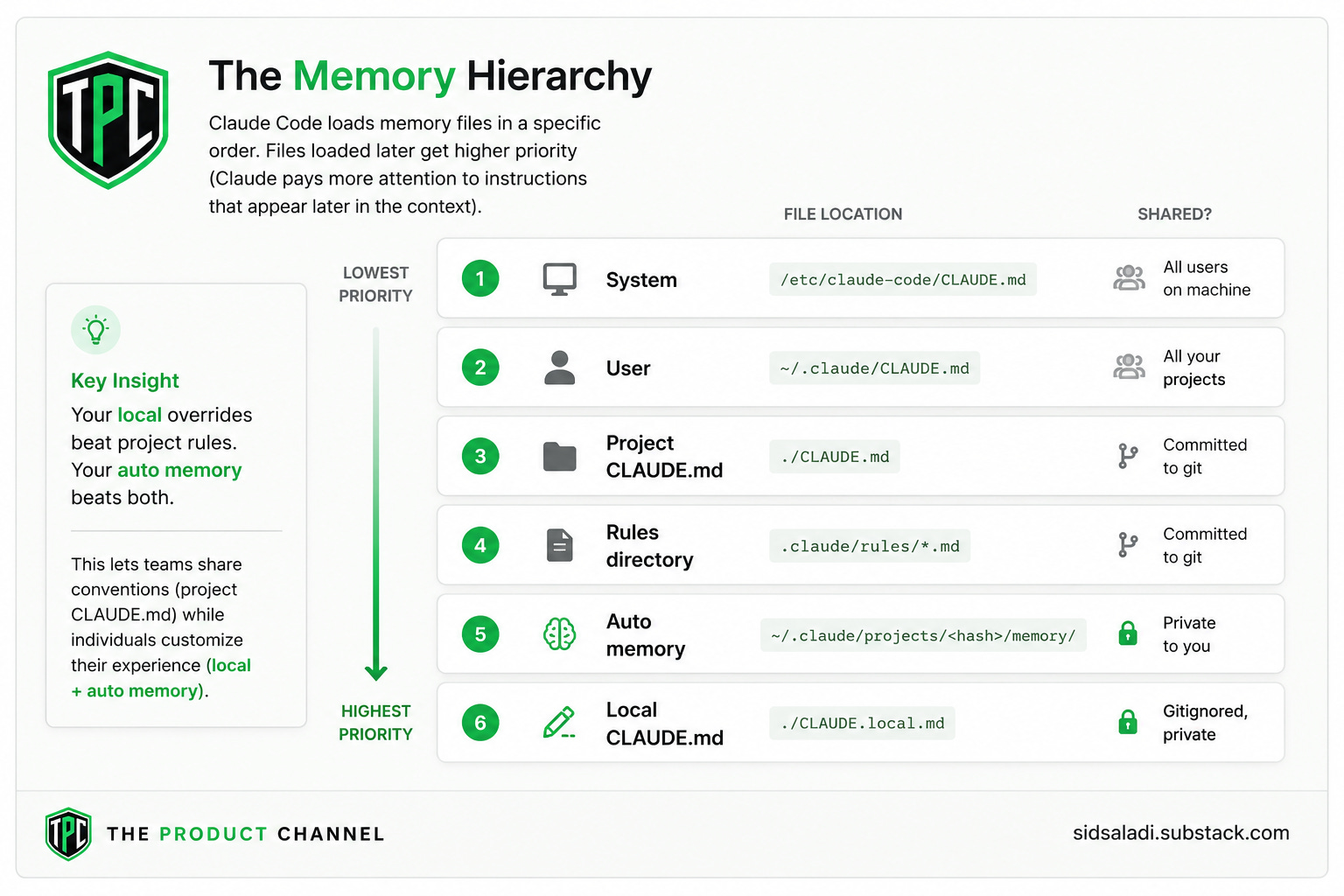
Let’s get specific. Here’s exactly what Claude Code loads, in what order, and where it lives.
The Memory Hierarchy
Auto Memory: The Feature Most People Miss
Keep reading with a 7-day free trial
Subscribe to The Product Channel By Sid Saladi to keep reading this post and get 7 days of free access to the full post archives.