
Hyperagent 101: The Complete Guide to Airtable's AI Agent Platform (+ $1,000 in Free Credits)
Setup guide, core features, 5 live demos, pricing breakdown, and 40 copy-paste workflows organized by role. Plus $1,000 in free credits — no credit card required.

You know what’s wrong with every AI agent you’ve tried?
They’re passive. You prompt, they react, then they go dormant—stalling out unless you’re manually pushing the buttons. And most are ephemeral: you’re stuck re-explaining your world every morning because your agent never actually executes or builds momentum on its own.
You spend 20 minutes teaching Claude your brand voice, your workflow, your preferences — and tomorrow? Clean slate. Start over. Do it again.
Hyperagent doesn’t forget — and it doesn’t wait. These are always-on agents: they run in live mode, act proactively, and keep momentum between conversations instead of going dormant the moment you stop typing. Your agents learn your world, remember your preferences, and pick up where they left off
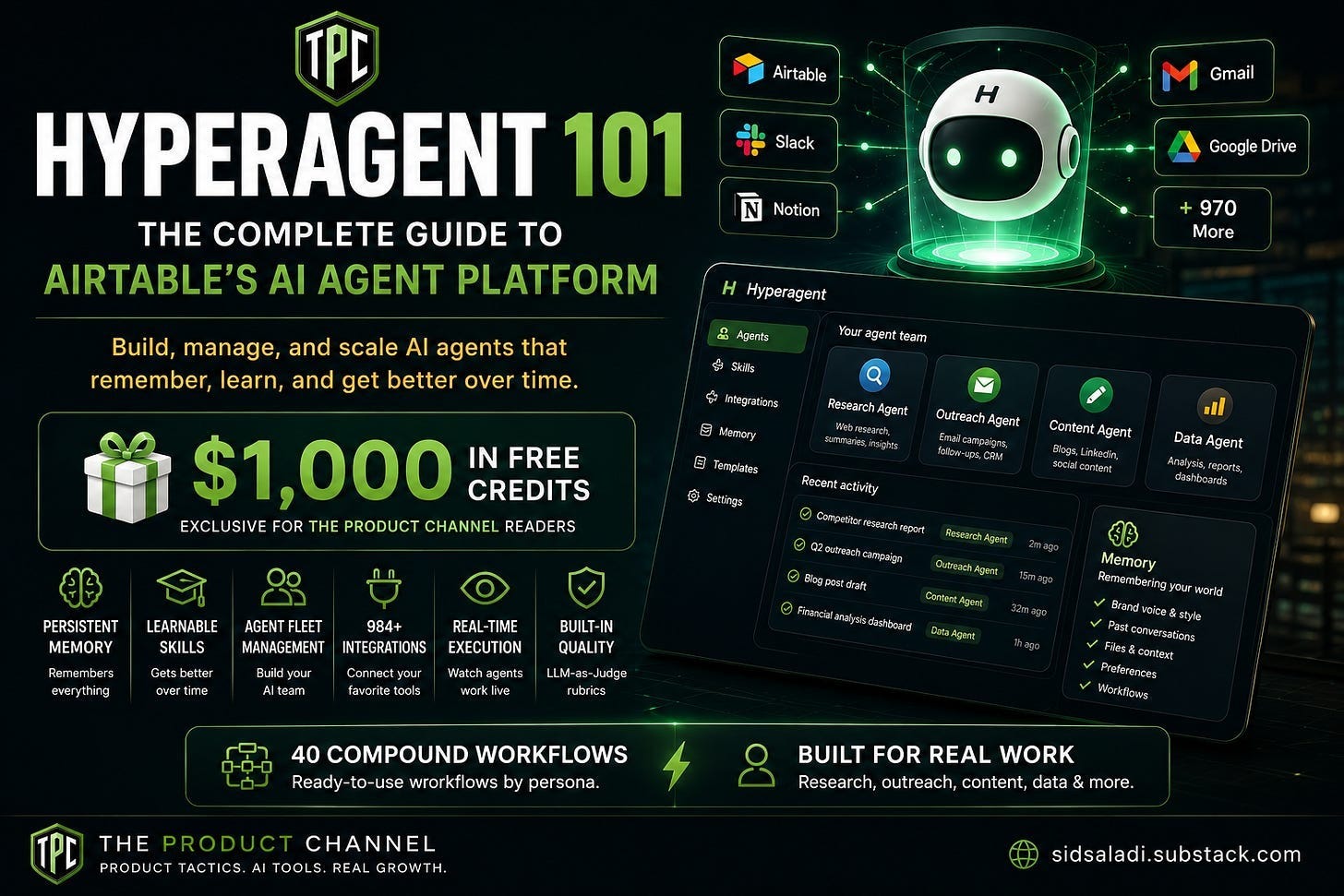
Built by Howie Liu — the same person who created Airtable — Hyperagent is the first AI agent platform where everything compounds. Your agents learn your world, remember your preferences, and get better with every conversation.
I’ve spent real time inside the platform. This guide covers everything: what it is, how to set it up, and 40 compound workflows organized by persona — each one showcasing features that only Hyperagent can do.
Let’s get into it.
🚨 Exclusive for TPC Readers: $1,000 in Free Credits
Before we dive in, Hyperagent is giving every Product Channel reader $1,000 in free credits to try the platform.
No catch. No credit card required upfront. Just sign up through this link:
→ Claim Your $1,000 in Hyperagent Credits
That’s enough credits to run dozens of real workflows. I’ll show you exactly how to spend them wisely below.
🤦 The Truth About AI Agents Right Now
Let me paint a picture you’ll recognize.
You open ChatGPT. You type a prompt. You get an answer. Great.
Tomorrow, you need a follow-up. But ChatGPT doesn’t remember yesterday’s conversation unless you manually load it. It doesn’t know your company. It doesn’t know your brand voice. It doesn’t know the research you already did.
So you re-explain everything. Again.
And it’s not just context you lose — it’s the work itself. Every workflow you figure out, you rebuild from scratch next time, because there’s nowhere for the agent to keep it.
Claude Code? Brilliant for coding. But it runs on your local machine, eats your laptop battery, and disappears when you close the terminal.
Manus? Cool demos. But users report billing black holes and inconsistent outputs.
Devin? Impressive engineering — with a 13.86% success rate on real-world tasks.
Here’s the pattern: every AI agent today is ephemeral. It exists for one conversation, then vanishes. No memory. No compounding. No building on what came before.
That’s like hiring an assistant who gets amnesia every morning.
Hyperagent is the first platform that actually solves this.
IT evolves beyond static instruction sets. IT transforms your recurring operations into durable, modular assets that execute instantly and compound in intelligence through repeated use.
🧠 What Is Hyperagent (And Why Should You Care?)
Hyperagent is a persistent AI agent platform built by Howie Liu, co-founder and CEO of Airtable.
Think of it as the difference between a chatbot and an employee.
A chatbot answers questions. An employee learns your business, builds skills over time, remembers what worked, and gets better every week.
Hyperagent gives you employees — digital ones.
Here’s what makes it different:
- Persistent memory — Your agents remember everything across conversations. Preferences, brand voice, past research, your entire working context.
- Learnable skills — Agents don’t just follow instructions. They codify your workflows into reusable “skills” that improve over time.
- Deploy an agent fleet — Construct a squad of digital specialists. Assign one to research, one to outreach, and another to content — each equipped with tailored tools, dedicated memory, and distinct budget caps. They even collaborate: your research agent can automatically hand off findings to your outreach agent, removing you as the bottleneck. And the fleet isn’t single-player — deploy an agent to Slack and your whole team can put it to work by @ mentioning it, so one specialist you build (a competitive-intel agent, a data agent) does the job for everyone instead of each person rebuilding it. It’s how Airtable runs its own data team: a single shared agent absorbs work that would otherwise eat hundreds of hours a week.
- Proactive, steerable execution (Live Mode) — These agents don’t sit idle waiting for the next prompt. They run autonomously, act on a schedule, and keep momentum between conversations. And when one is working, you’re not locked out — Live Mode lets you watch it reason in real time and redirect it mid-run, instead of submitting a task and praying. It reasons and adapts rather than following a rigid flowchart, so it figures out how to get the job done instead of breaking the moment reality doesn’t match the script.
- Seamless Connectivity — Bridge your ecosystem with direct hooks into Airtable, Slack, Gmail, GitHub, Notion, and Supabase. Use Hyperagent’s native integration layer or bring your own MCP server to connect literally any tool in your stack.
- Persistent cloud infrastructure — Every agent lives in a dedicated virtual machine with a native browser. They don’t just hallucinate; they execute—installing libraries and running software in real-time while you watch the gears turn. No black boxes.
- LLM-as-Judge quality control — Built-in rubrics that evaluate agent output quality. Think automated QA for your AI team.
The key insight: Hyperagent isn’t another chat wrapper around GPT. It’s an agent platform — infrastructure for deploying, managing, and scaling a team of AI agents that compound knowledge over time.
Who’s behind it? Who’s behind it? Howie Liu — the founder of Airtable. With Hyperagent he’s chasing the same thing that made Airtable click: handing regular people tools that used to require an engineer. It launched in April 2026 and runs on frontier models including Claude Opus 4.8.
⚡ Getting Started: Setup in 5 Minutes
Getting into Hyperagent is straightforward.
Step 1: Sign up and claim your credits
Head to hyperagent.com/invite/THEPRODUCTCHANNEL and create your account. You’ll get $1,000 in free credits loaded automatically.
You can sign up with Google, making it a one-click process.
Step 2: Meet the interface
When you land on the dashboard, you’ll see:
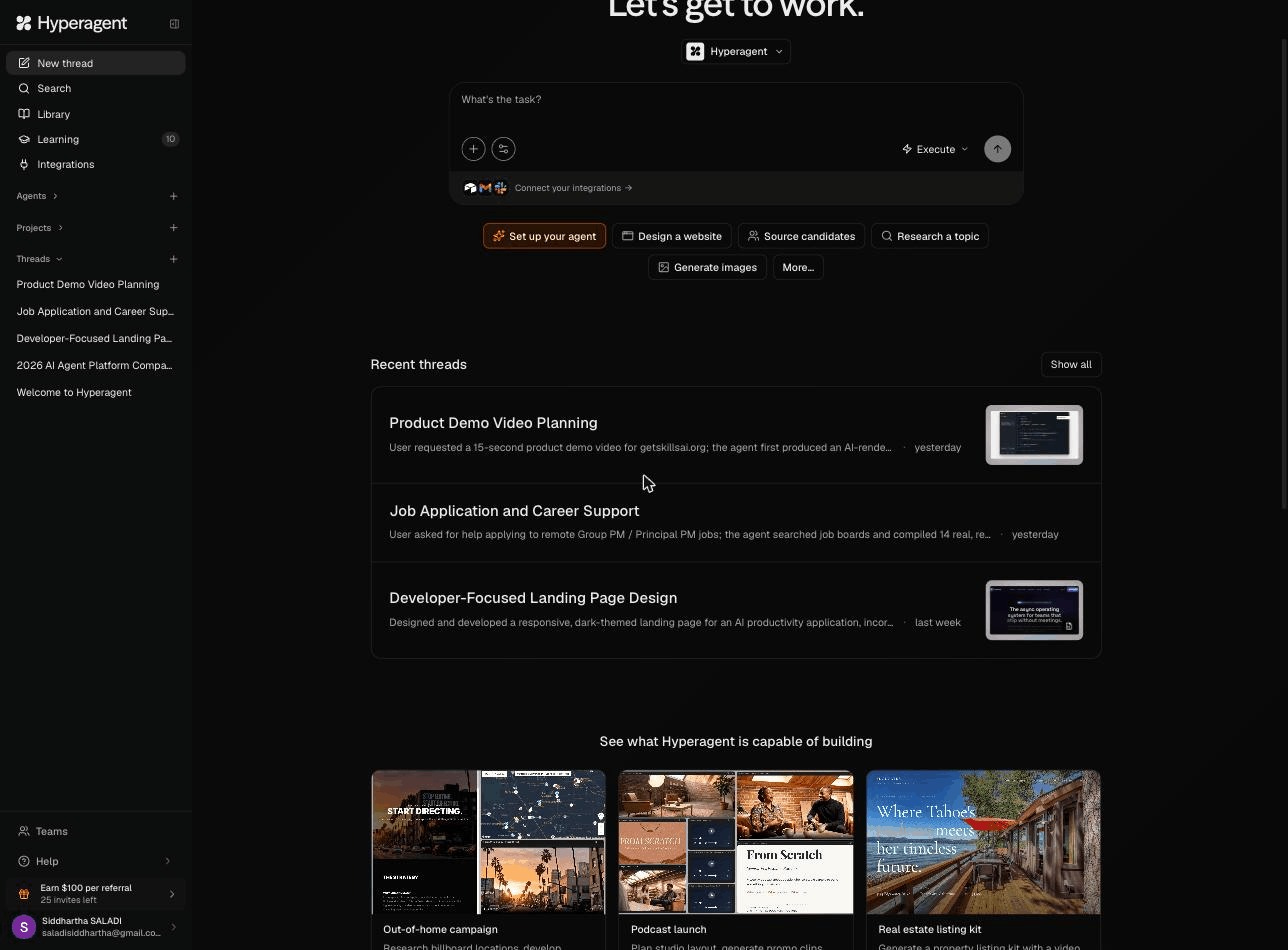
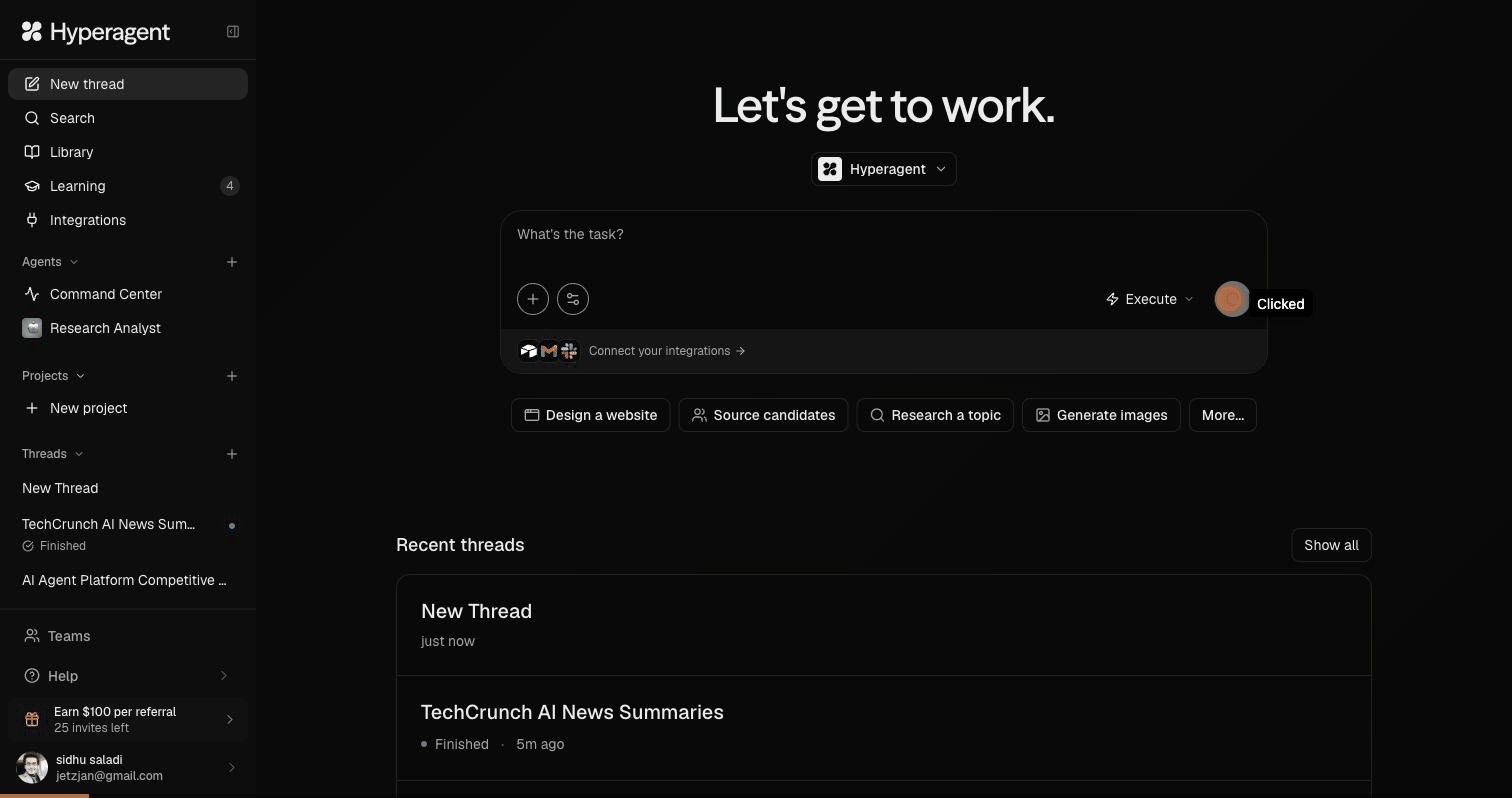
The task composer (”Let’s get to work.”) — The home surface. Type your task into the “What’s the task?” box and hit Execute, and the agent gets to work.
Quick actions — One-click starters beneath the composer, organized by what you want produced: Design a website, Source candidates, Research a topic, or Generate images, with a More… menu that opens up Video, Audio, Slides, Map, and Doc.
Agents — A picker for choosing who runs the job, from the default general-purpose Hyperagent to specialized agents you build or adopt for recurring work.
Learning — The hub where the agent gets smarter about you over time, rather than asking you to onboard it once. It’s built on three pillars: Skills, Memories, and Rubrics.
Command Center — An operations dashboard for monitoring your agents: their runs, quality scores, costs, and anything that needs your attention.
Library — A gallery of everything your agents have produced websites, decks, and more with filters by Type, Visibility, and Source, plus sorting, archiving, and grid or list views.
Step 3: Teach your agent
This is the most important step. Click “Teach me your world” and tell Hyperagent:
- Your name and company
- What you do day-to-day
- Your brand voice and style preferences
- Tools you use regularly
- Types of tasks you need help with
Why this matters: Everything you share here compounds across every future conversation. The more you teach, the less you have to re-explain.
Step 4: Connect your integrations
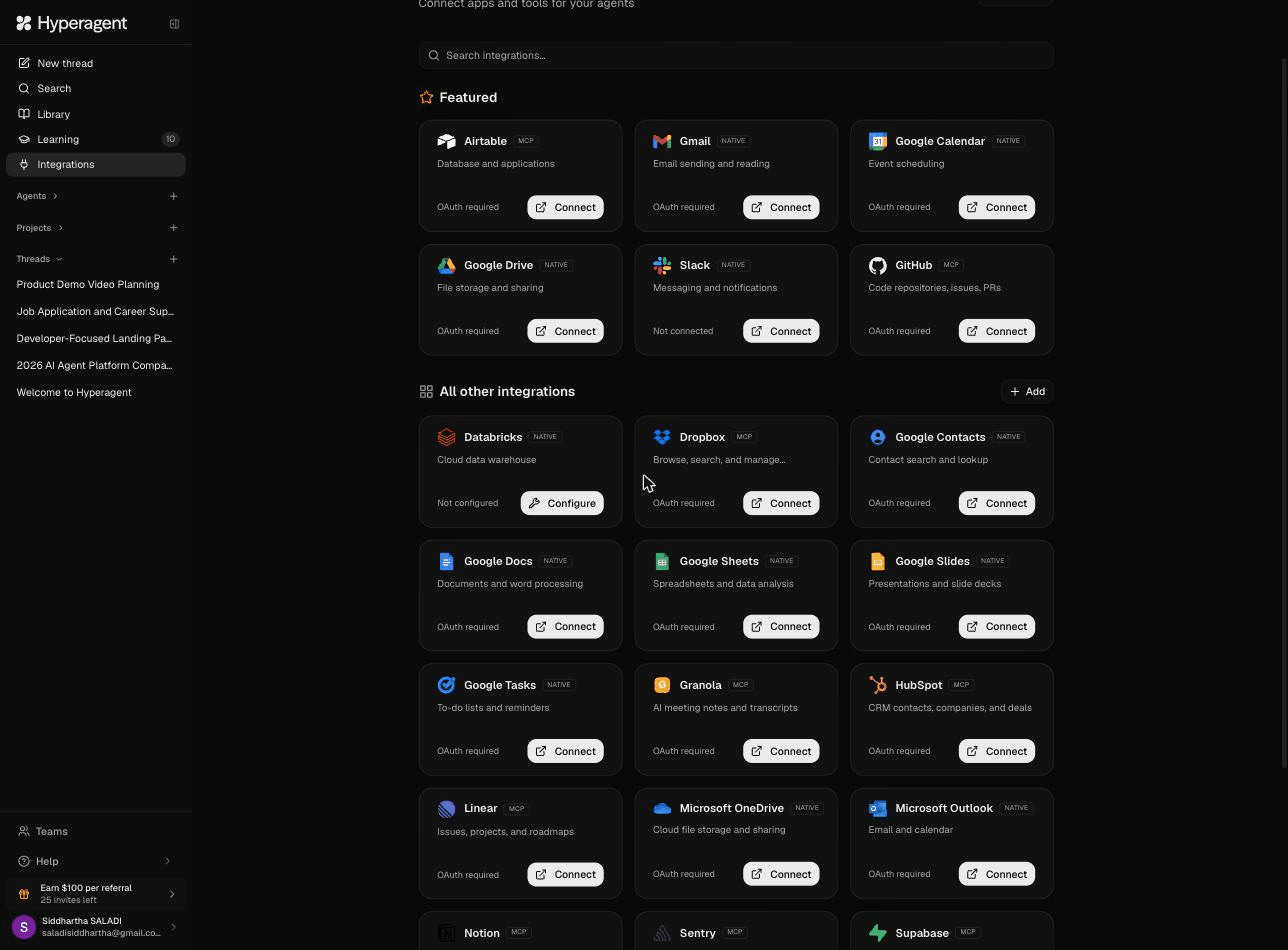
Navigate to Integrations in the left sidebar. Featured integrations include:
- Airtable — Database and applications
- Slack — Messaging and notifications (also works as a trigger)
- Gmail & Gsuite — Email sending and reading
- GitHub — Code repositories, issues, PRs
- Databricks / Snowflake — Cloud data warehouses
- Notion — Notes and documentation
- Dropbox — File storage
- Microsoft Outlook / OneDrive — Email, calendar, files
Each integration uses OAuth — one click to connect. And here’s a critical detail: you assign integrations per agent, not globally. Your research agent gets access to Google Drive. Your outreach agent gets Gmail. Clean separation. Better security.
And you’re not boxed into this list. Anything Hyperagent doesn’t support natively, you connect yourself — either bring your own MCP server or build a Skill that wires up the tool directly. Both can store their own API credentials securely, so a single agent can call an internal API or hit a tool that isn’t in the featured list at all. The native integrations are the fast path; MCP and Skills are the escape hatch for everything else.
Step 5: Pick your execution mode
When you type a task, you’ll notice a dropdown that says ”Plan” or ”Execute”:
- Plan mode — The agent creates a detailed plan and waits for your approval before doing anything. Perfect for high-stakes or expensive tasks.
- Execute mode — The agent runs immediately. Best for tasks you’ve done before or quick research.
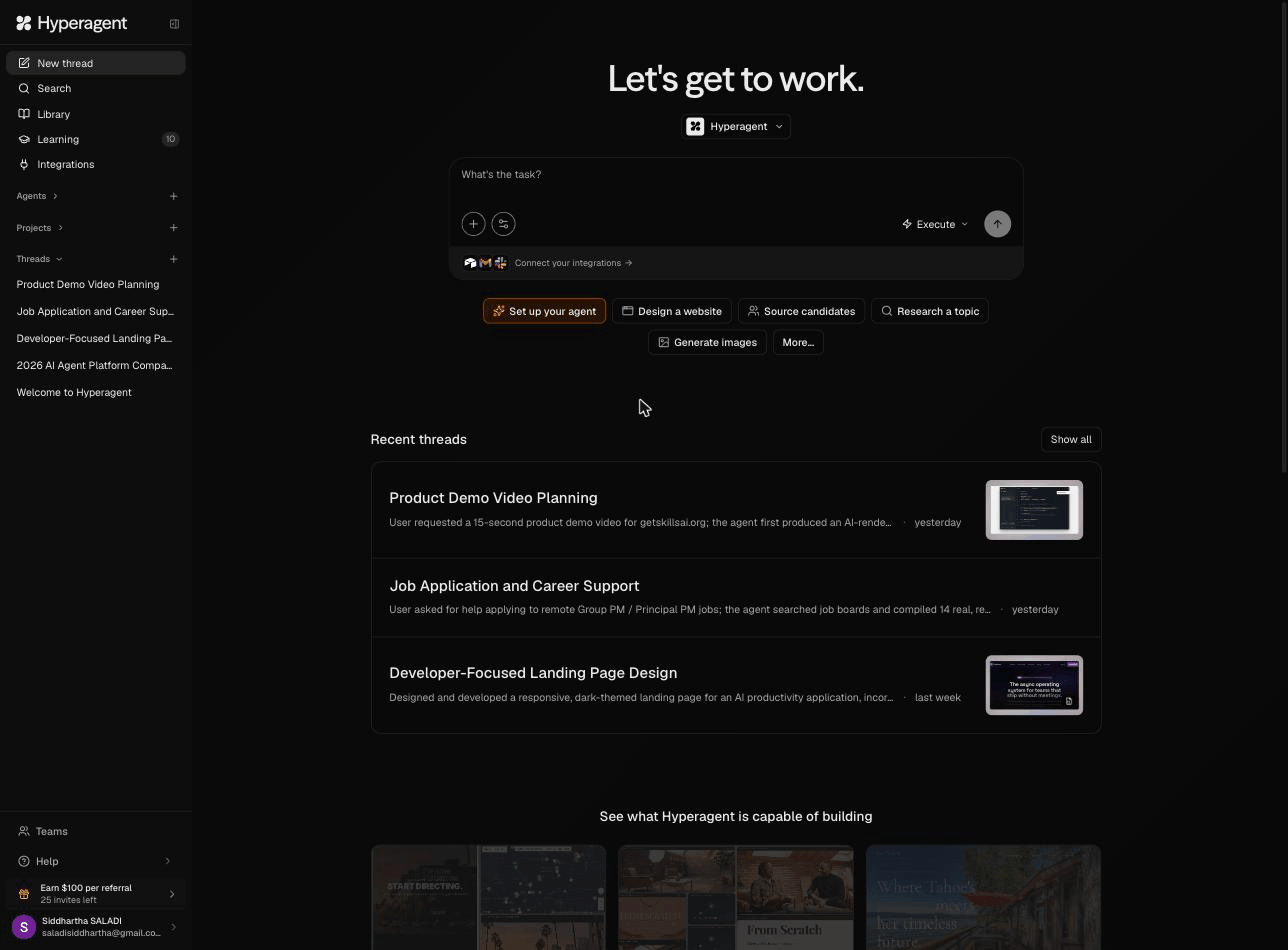
That’s it. You’re up and running. Start with “Research [your industry] trends for Q3 2026” and watch what happens.
Common setup issues:
- Integrations not connecting? Make sure you’re signed into the correct Google/Microsoft account first.
- Agent seems generic? You haven’t taught it enough context. Spend 5 minutes in the “Teach me your world” flow.
- Credits not showing? Make sure you signed up through the TPC link. Credits load `automatically.
🔍Inside Hyperagent: The Building Blocks
Each Hyperagent arrives fully equipped with a native cloud infrastructure stack: a persistent virtual machine, real-time code execution, a dedicated browser, and Exa-fueled web intelligence. It doesn’t just chat—it builds, generating images, video, and audio directly in your workflow. Here is the architecture of how those digital specialists actually operate
1. Threads — Your Conversation Hub
Every task lives in a thread. Think of threads like project-specific conversations..
You can:
- Start new threads for different tasks
- Watch real-time execution as the agent works
When you’d use it: Every single interaction. This is home base.
2. Agents — Your Specialized Team
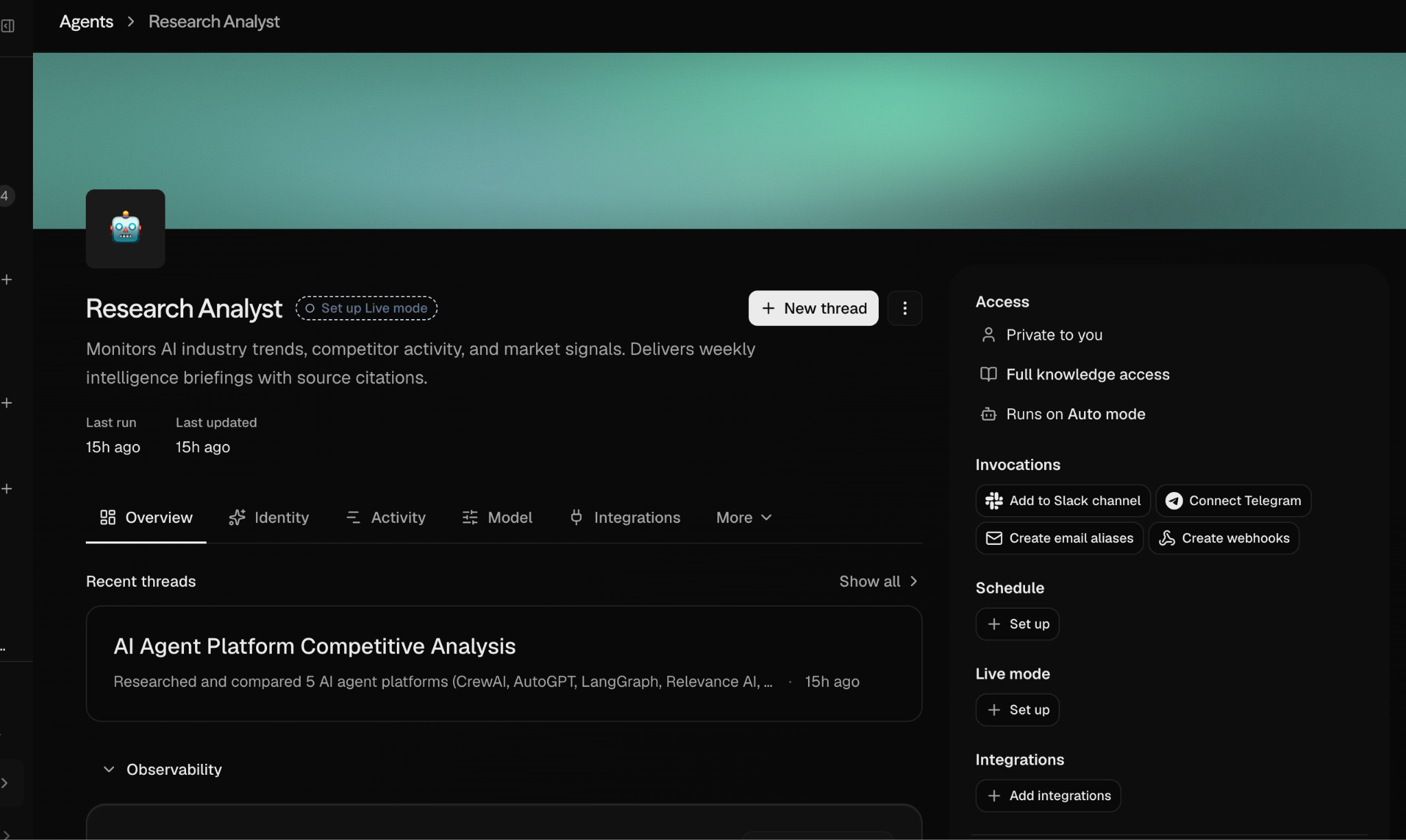
This is where Hyperagent gets powerful. Create specialized agents, each with:
- Custom system prompts — Define the agent’s role and personality
- Specific integrations — Only the tools this agent needs
- Budget limits — Cap spending per agent
- Model selection — Choose which LLM powers each agent
When you’d use it: When you have recurring workflows. Build an agent for outreach, another for research, another for content creation.
3. Invocations — Triggers and Schedules
Two powerful ways to run agents automatically:
- Slack triggers — Your agent listens in Slack channels and responds to messages. Mention it and it springs to action.
- Scheduled runs — Set recurring tasks. “Every Monday at 9am, pull this week’s analytics.”
- Live Mode — Don’t just kick off a task and walk away. Watch the agent reason and act in real time, and step in to redirect it mid-run. This is the difference between “submit and pray” and actually steering the work.
When you’d use it: Automation. The agent works while you sleep.
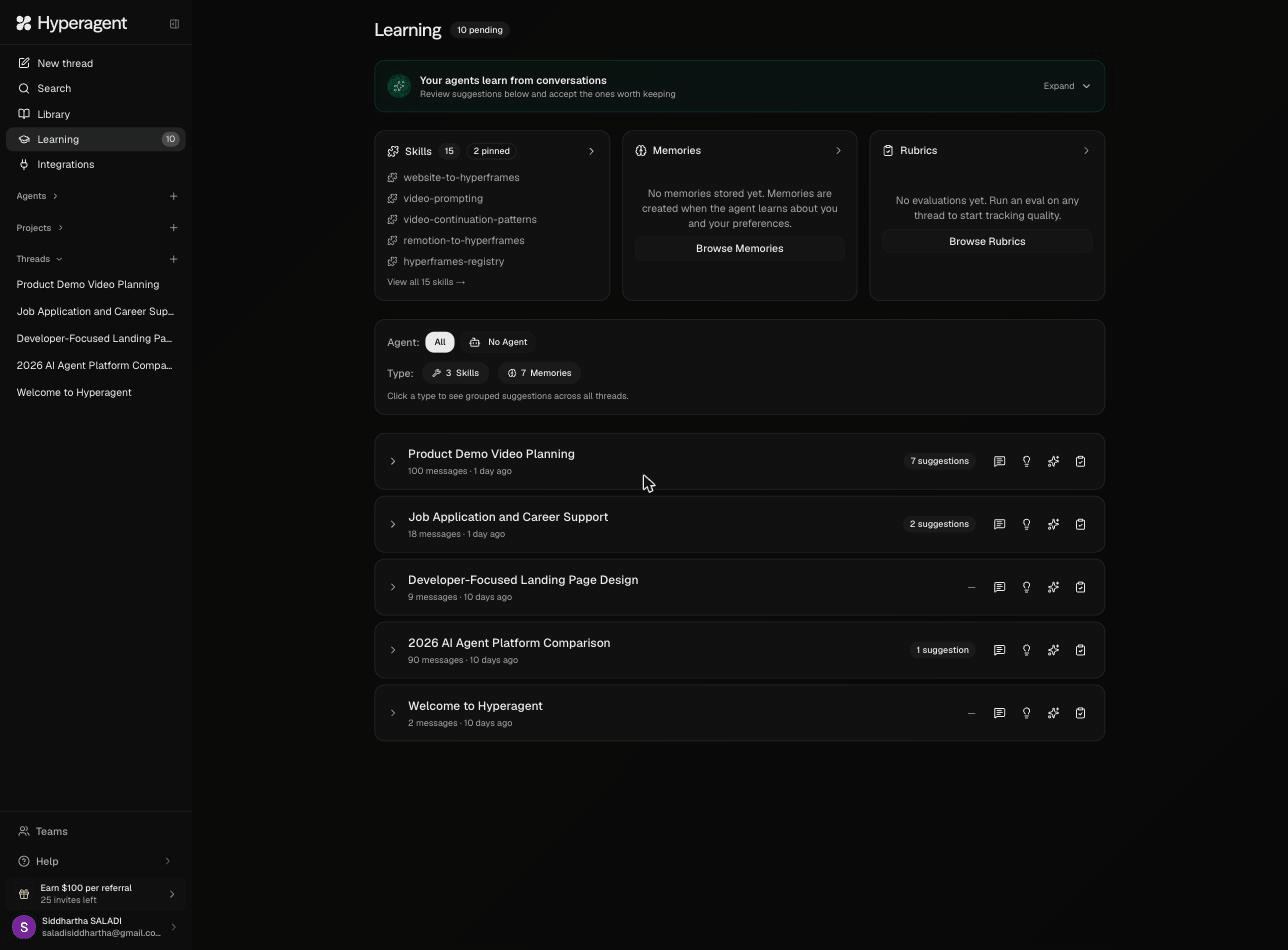
4. Learning — Skills, Memories, and Rubrics
Agents are the who. Learning is the how they get better. Every agent you build draws on a shared pool of skills and memories — so teaching one agent something can pay off across your whole fleet.
The compound intelligence engine. Three components:
Skills — Workflows your agent learns from you
Skills are codified workflows that Hyperagent learns by watching how you work. Once you complete a task, Hyperagent can capture the underlying pattern and turn it into a reusable skill you can trigger again and again. Skills like “website-to-hyperframes” and “video-prompting” are examples the platform has learned this way.
But skills go far beyond saved instructions. Each one can run its own Python scripts and store its own API keys for custom integrations. That means a single skill can call an internal API, transform data, or wire up a tool that Hyperagent doesn’t support out of the box — extending what your agent can do without waiting for native support
Memories — Personal context the agent stores about you and your preferences. Your brand voice. Your preferred formatting. The tools you like. Everything compounds.
Rubrics — LLM-as-Judge evaluations. Define quality criteria, and Hyperagent evaluates its own output against your standards. This is built-in A/B testing for your agent workflows.
When you’d use it: Review the Learning section weekly. Accept good suggestions. Reject bad ones. This is how your agent team gets smarter over time.
5. Browser Environment
Hyperagent has a built-in browser. It can navigate websites, fill forms, extract data, and interact with web apps. Watch it work in real time.
When you’d use it: Research, competitive analysis, data extraction, and any task that requires browsing the web.
6. Image and Video Generation
Built directly into the platform. Generate marketing visuals, social media images, product mockups — all within the same workflow. No switching to Midjourney or DALL-E.
When you’d use it: Content creation, ad creative, social media graphics, product photography mockups.
🎬 Seeing It In Action: Two Live Demos
I don’t just write about tools. I test them. Here’s what happened when I ran two real tasks inside Hyperagent — no rehearsal, no cherry-picking.
Demo 1: “Research the Top 5 AI Agent Platforms”
I typed a single prompt. What happened next blew me away.
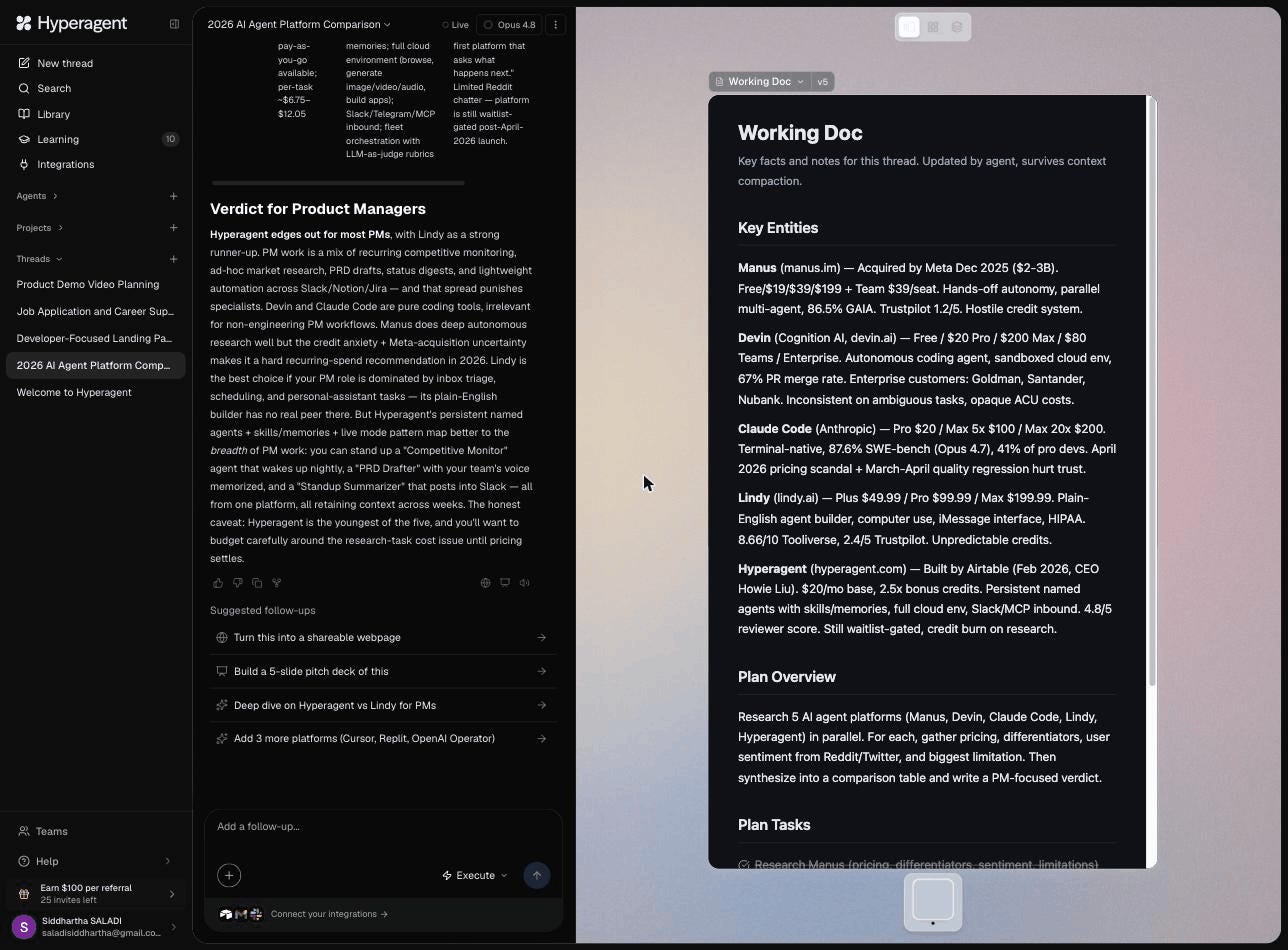
Hyperagent dispatched five named agents simultaneously — Sprocket, Glorb, Fizz, Nibble, and Whisker — each researching a different platform. I watched them search the web in real-time, pull data from multiple sources, and report back.
The output: A comprehensive comparison table covering Manus, Devin, Claude Code, Lindy, and Hyperagent — with pricing tiers, key differentiators, user sentiment, and cost transparency for each platform. It even ended with a “Verdict for Product Managers” section.
Time: Under 5 minutes. What it would’ve taken me manually: 2-3 hours of tab-juggling.
The Thread Context panel auto-populated with structured data about each platform — pricing, features, and user reviews — all surviving context compaction for future reference.
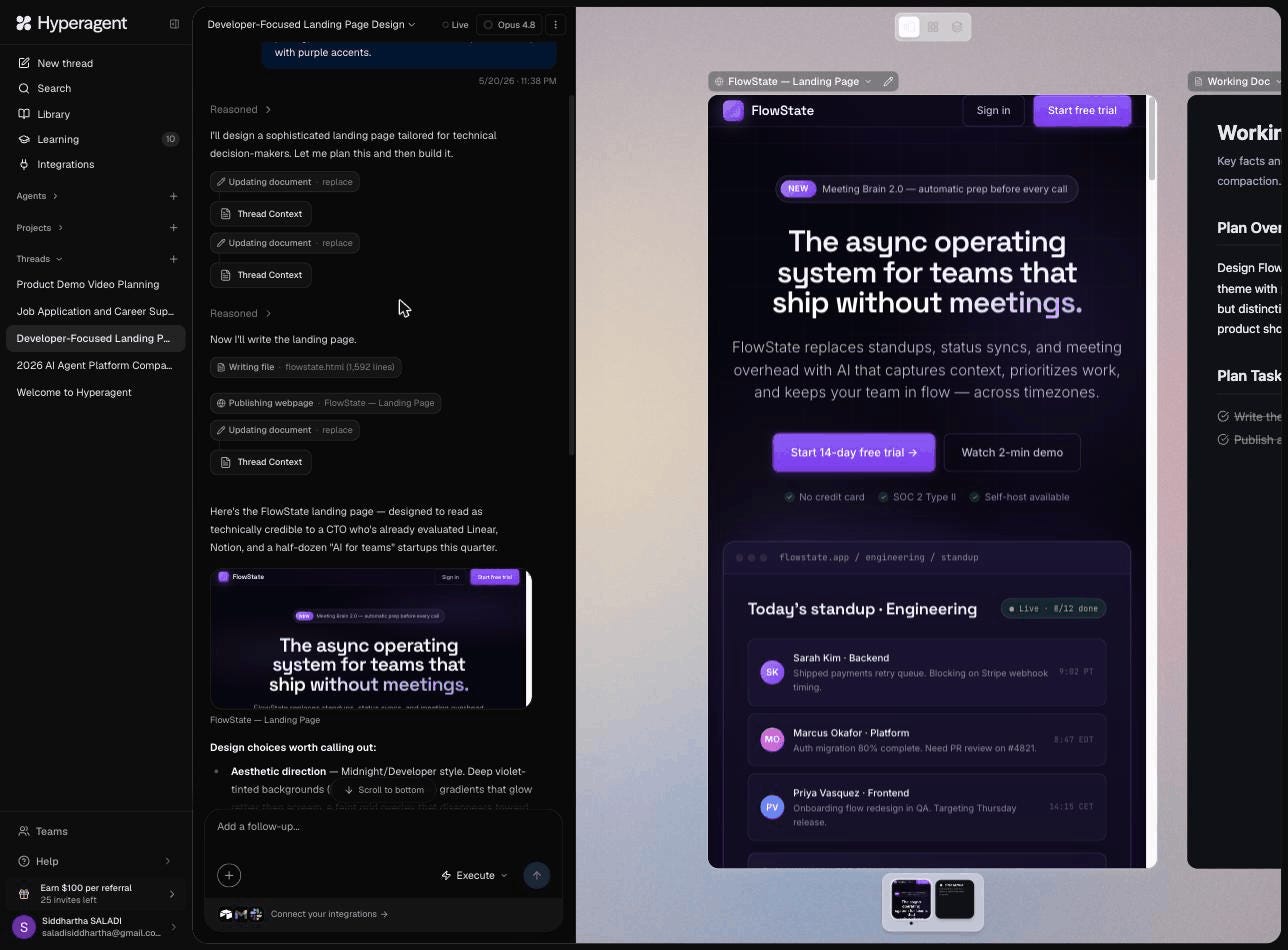
Demo 2: “Design a Landing Page for FlowState”
I asked Hyperagent to design a landing page for a fictional AI productivity app called “FlowState” — targeting Series A startup CTOs, dark theme, purple accents.
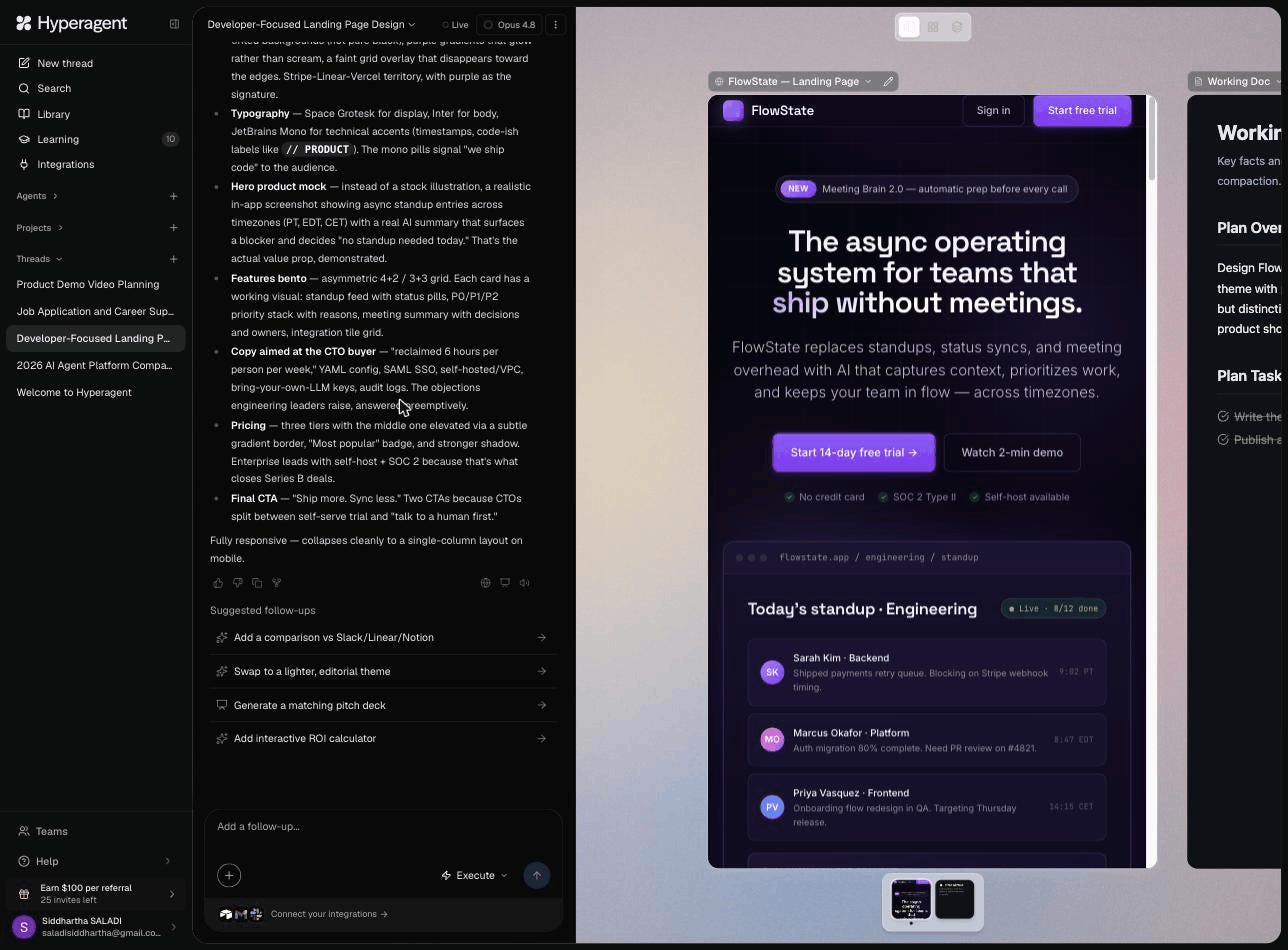
The agent reasoned through design choices (Linear/Vercel aesthetic, Space Grotesk + Inter + JetBrains Mono typography stack), then wrote 1,592 lines of production HTML and published it as a live webpage — all while I watched.
The output: A fully responsive, professional-grade landing page with:
- Sticky navigation with sign-in/trial CTAs
- “NEW” feature badge with announcement banner
- Hero section: “The async operating system for teams that ship without meetings.”
- Feature bento grid with working visual components
- Three-tier pricing table with “Most popular” highlighting
- CTO-specific copy (YAML config, SAML SSO, self-hosted/VPC, SOC 2)
- Trust badges and social proof
Time: Under 3 minutes for a publishable page. Cost: Less than $5.
The suggested follow-ups were the cherry on top: “Generate a matching pitch deck,” “Add interactive ROI calculator,” “Swap to a lighter editorial theme.” One prompt, then keep building.
Demo 3: “Launch a Podcast From Scratch”
I asked Hyperagent to launch a podcast called “The AI Builder’s Lab” — a weekly show for PMs building with AI. In under 8 minutes, it produced:
- Two professional cover art concepts (a blueprint-style lab design and a bold typographic variant)
- A 60-second audio trailer with voiceover — fully produced, playable, downloadable
- A complete strategy playbook document with positioning, audience analysis, and a 12-episode Season 1 lineup
- A live landing page with “Follow the show” CTA, episode format breakdown, and subscriber capture
Demo 4: “Create a Real Estate Listing Kit”
I gave Hyperagent a property description: 4-bedroom modern home in Austin, TX, $785K. It generated a complete, production-ready listing kit:
- Five photorealistic property images — twilight exterior hero, chef’s kitchen, primary suite, spa bathroom, and backyard pool at sunset. These look like real professional real estate photography.
- A polished marketing website (413 lines of HTML) with photo gallery, property details grid, neighborhood section, and open-house CTA
- A 10-section copy deck with MLS descriptions, social captions for IG/FB/LinkedIn, an email blast template, a “Just Listed” postcard, and agent talking points
Time: Under 10 minutes. Cost: ~$8. A listing agent could use this package immediately.
Demo 5: “Build a Startup Investor Pipeline”
This one blew me away. I described a fictional AI meeting assistant (FlowSync AI, $1.2M ARR, raising $8M Series A) and asked Hyperagent to build an investor pipeline.
It dispatched two named research agents in parallel — “Mosaic” (Cap-Table Scout) and “Atlas” (Fund Profiler) — each searching different data sources simultaneously.
The output: a ranked shortlist of 21 VC firms with detailed profiles for each — fund name and size, whether they lead Series A rounds, typical check size, thesis alignment, and portfolio companies. Emergence Capital came back as the #1 “TOP MATCH” (Emergence VII — $1B fund, $5–15M checks, leads ~1 deal per year).
It even flagged conflict risks (funds that had backed direct competitors) and noted our warm intro paths to a16z and First Round.
Time: Under 12 minutes. Cost: ~$10. This is a $2,000 research analyst deliverable.
How much do things actually cost?
Based on the example projects I tested:
- Out-of-home campaign (research + creative + visualization): $6.41 in 8 minutes
- Podcast launch (studio layout + promo clips + media kit): $14.20 in 25 minutes
- Real estate listing kit (video + website + buyer handout): ~$10-15 in 9 minutes
- Full startup workflow (market research + competitive analysis + prototype + marketing site): ~$35
These are real, production-quality outputs. Not demos. Not toy examples.
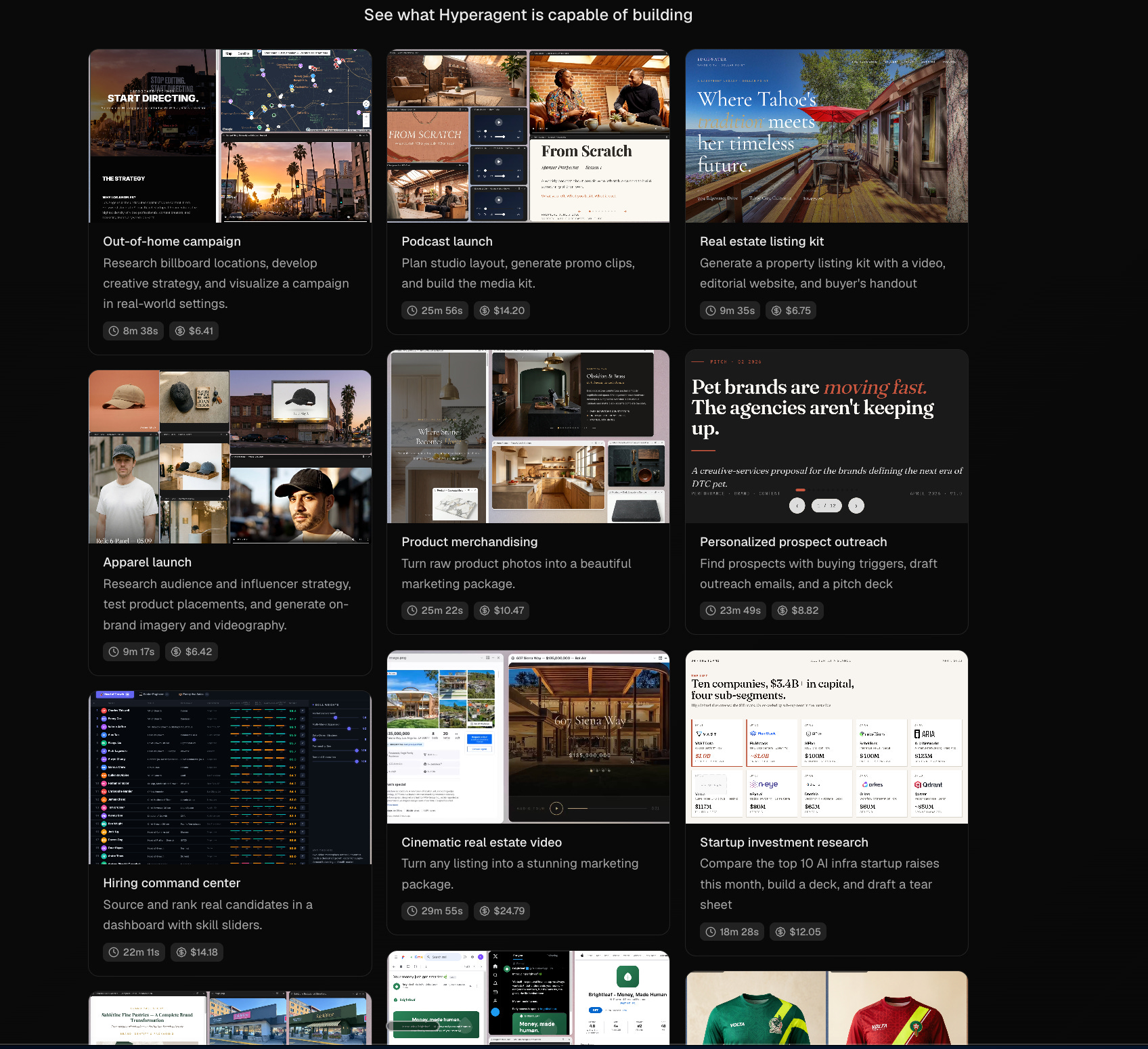
Your $1,000 in TPC credits = roughly 30-60 full workflows. That’s weeks of productive work.
→ Claim Your $1,000 in Free Credits
📋 How to Use This Playbook
These aren’t generic prompts you could paste into ChatGPT.
Every workflow below uses features only Hyperagent has — persistent memory, parallel agents, live web research, integrations with your real tools, scheduled runs, and compound intelligence that builds over time.
Each one tells you:
- What Hyperagent features it uses (so you know why this can’t be done elsewhere)
- The exact prompt to copy-paste
- Expected cost based on typical runs
I’ve organized these by persona. Find yours and start there.
🧠 My Personal Workflow
Here’s how I (Sid) actually use Hyperagent day-to-day:
Morning (automated, I don’t touch anything):
- 7 AM: My “Monday Briefing” agent runs, pulls AI industry news, and sends me a Gmail digest
- My “Competitive Radar” agent checks 5 newsletter competitors bi-weekly
During the day (on-demand):
- Meeting prep dossiers before any external call
- Content repurposing after I publish each deep dive (article to LinkedIn/Twitter/Instagram)
- Research threads for upcoming newsletter topics (Hyperagent does the first 80% of research)
Weekly (automated):
- Friday team digest pulled from our Slack channels
- Customer feedback sweep across Reddit, Twitter, and review sites
The prompt that changed my workflow the most:
Before responding to anything I ask, check my memories and skills first.
Apply what you know about my voice, preferences, and past decisions.
If this is similar to something we’ve done before, start from that template — don’t reinvent.
This single instruction turned Hyperagent from “smart chatbot” to “actual assistant.”
🧑💻 FOR EVERYDAY AI USERS
Productivity Workflows
1. The Monday Morning Autopilot
Features used: Scheduled invocations, web browsing, memories, Gmail integration
Set up a scheduled weekly briefing that runs every Monday at 7:00 AM.
Research the top developments in [YOUR INDUSTRY] from the past 7 days.
Cross-reference with my interests and role that you’ve learned from our past conversations.
Flag anything that directly affects [YOUR COMPANY].
Format as a scannable 3-minute briefing with:
- 5 headlines with 2-sentence summaries
- Source links for each
- A “What This Means For You” section personalized to my role
- One action item for the week
Send the briefing to my Gmail as a draft ready to review.
Why this is Hyperagent-only: ChatGPT can’t schedule runs. Claude can’t send to Gmail. Neither remembers what you care about across sessions.
2. Inbox Zero Pipeline
Features used: Gmail integration, memories (your voice/style), persistent context
Connect to my Gmail and review the last 30 unread emails.
Categorize each as:
- URGENT: needs my reply today
- IMPORTANT: this week
- FYI: just read
- ARCHIVE: no action needed
For each URGENT email, draft a reply in my voice.
You know my style from past conversations — [BRIEF REMINDER: e.g., professional but direct, always suggest a next step, keep under 3 sentences].
Create the drafts directly in Gmail so I can review and send.
Why this is Hyperagent-only: It actually connects to your Gmail, drafts real replies in your learned voice, and creates real drafts you can send with one click.
3. Meeting Prep Dossier
Features used: Web browsing (parallel research), Google Calendar integration, document creation
Check my Google Calendar for meetings today.
For each meeting with an external person:
1. Research them — LinkedIn, recent posts, company news from the last 90 days
2. Research their company — funding, product launches, press coverage
3. Find any connections between their work and mine
Create a one-page dossier for each meeting with:
- 5 talking points that show I’ve done my homework
- 2 questions that would genuinely impress them
- Any mutual connections or shared interests
- Recent company news I should reference
Save each dossier as a shareable document.
Why this is Hyperagent-only: It pulls your actual calendar, researches multiple people in parallel, and creates real documents — not just text in a chat window.
4. Travel Command Center
Features used: Web browsing (parallel search), document creation, memories (preferences)
Plan my trip to [DESTINATION] from [DATES] for [PURPOSE].
Budget: [AMOUNT].
You know my preferences from past trips — [BRIEF REMINDER: e.g., boutique hotels over chains, walkable neighborhoods, local food over tourist spots].
Research in parallel:
- Flight options with real-time prices
- 5 hotel options with current availability and reviews
- Restaurant picks matching my dietary preferences: [PREFERENCES]
- Must-see spots ranked by traveler ratings
- Local transport options and tips
Create a complete day-by-day itinerary as a shareable document.
Include a packing checklist based on the weather forecast for those dates.
Why this is Hyperagent-only: Parallel web searches for real-time prices, remembers your travel preferences from past trips, creates a real shareable document.
5. Personal Knowledge Base Builder
Features used: Web browsing, skills, Library, persistent memory
I just finished reading [BOOK/ARTICLE/PODCAST] about [TOPIC].
Here are my key takeaways: [PASTE YOUR NOTES OR HIGHLIGHTS]
Turn this into:
1. A structured summary (core thesis, 5 key insights)
2. For each insight: one specific thing I can implement this week at [MY COMPANY/ROLE]
3. Connections to things we’ve discussed before — how does this relate to past projects or ideas I’ve shared?
Save this to my Library and create a skill called “[TOPIC]-insights” so you can reference these ideas in future conversations.
Why this is Hyperagent-only: It saves to your Library permanently, creates reusable Skills from your learnings, and connects new knowledge to past conversations. Your knowledge actually compounds.
Research Workflows
6. Multi-Source Deep Research
Features used: Parallel web browsing (multiple agents), document creation, Thread Context
Research [COMPLEX TOPIC] from multiple angles simultaneously.
Dispatch parallel searches across:
- Academic and industry reports
- Reddit and community discussions (real user opinions)
- Recent news coverage (last 90 days)
- Expert blogs and thought leaders
- YouTube/podcast summaries
Synthesize everything into a research brief with:
- The consensus view (what most sources agree on)
- The contrarian view (what dissenting voices say)
- Data points with citations
- A “So What?” section for someone in my role
- Confidence level for each claim (verified vs. anecdotal)
Save the raw research in Thread Context so I can ask follow-up questions later without re-researching.
Why this is Hyperagent-only: Dispatches multiple parallel searches simultaneously, synthesizes across sources, and saves everything in Thread Context for follow-up questions that reference the original research.
7. Competitive Price Watcher
Features used: Scheduled invocations, web browsing, persistent memory, Slack integration
Set up a weekly competitive monitor.
Every [DAY] at [TIME], research:
- [COMPETITOR 1]: pricing page, new features, blog posts
- [COMPETITOR 2]: same
- [COMPETITOR 3]: same
Compare to what you found last time (you have the history from previous runs).
Flag any changes with a “CHANGE DETECTED” tag.
Post a summary to Slack channel [#CHANNEL] with:
- What changed since last week
- New features they launched
- Pricing adjustments
- Any press coverage or funding news
- “Should We Worry?” rating (1-5 with reasoning)
Why this is Hyperagent-only: Scheduled recurring runs, remembers last week’s data to detect changes, posts directly to Slack. This runs on autopilot every week — you never touch it.
8. Learn-Anything Accelerator
Features used: Web browsing, document creation, skills, memories
I want to learn [SKILL/TOPIC] in the next 30 days.
My current level: [BEGINNER/INTERMEDIATE/ADVANCED]
Time available: [X] hours per week
Research the best learning path:
1. Find the top-rated courses, books, and tutorials (check Reddit, Hacker News, and review sites)
2. Create a week-by-week learning plan with specific resources
3. For each week: learning goals, resources to complete, and a mini-project to build
4. Find 3 communities to join for accountability
Save this as a skill called “[TOPIC]-learning-plan” so you can track my progress in future conversations and adjust the plan based on what I’ve completed.
Why this is Hyperagent-only: Web research for real resources with real reviews, creates a persistent learning plan as a Skill, and tracks your progress across sessions.
Content & Creative Workflows
9. Content Repurposing Engine
Features used: Document creation, memories (brand voice), image generation
Take this content I wrote: [PASTE ARTICLE/NEWSLETTER/BLOG POST]
You know my brand voice from past conversations. Repurpose this into:
1. A LinkedIn post (hook + insight + CTA, 150-200 words)
2. A Twitter/X thread (5-7 tweets, each standalone)
3. An Instagram carousel outline (8 slides with headline + supporting text for each)
4. A newsletter teaser (3 sentences to drive clicks)
5. 3 pull quotes for social media graphics
Generate 3 social media graphics using the pull quotes — clean, on-brand design with [MY BRAND COLORS/STYLE].
Save these as shareable documents I can send to my content team.
Why this is Hyperagent-only: Remembers your brand voice, generates real images, creates shareable documents — all in one thread. A content pipeline, not a prompt.
10. Website Builder From Scratch
Features used: Browser environment (code writing), web publishing, image generation
Build a landing page for [PRODUCT/PROJECT].
Target audience: [DESCRIBE]
Value proposition: [ONE SENTENCE]
Style reference: [e.g., “clean like Stripe” or “bold like Linear”]
Create a complete, responsive landing page with:
- Hero section with compelling headline and CTA
- 3-4 feature sections with icons
- Social proof / testimonials section
- Pricing (if applicable)
- FAQ
- Footer with links
Write the full HTML/CSS. Use modern design patterns.
Publish it as a shareable webpage I can preview immediately.
Generate any images or graphics needed for the page.
Why this is Hyperagent-only: Writes real code, publishes a live preview you can see instantly, generates images — all in one conversation. We tested this exact workflow with the FlowState landing page (1,592 lines of HTML).
📊 FOR PRODUCT MANAGERS
Research & Discovery Workflows
11. User Interview Synthesizer
Features used: Document creation, persistent memory, Thread Context (Key Entities)
I conducted [NUMBER] user interviews about [PRODUCT/FEATURE].
Here are my raw notes: [PASTE NOTES OR UPLOAD FILE]
Analyze and produce a stakeholder-ready research brief with:
1. Key themes grouped by frequency (with direct quotes)
2. Unmet needs — things users want but didn’t explicitly ask for
3. Surprising findings that contradict our assumptions
4. Pain point severity matrix (frequency x intensity)
5. Recommended next steps (prioritized by impact)
Save the key entities (user segments, pain points, feature requests) to Thread Context so I can reference this research in future product threads without re-uploading.
Why this is Hyperagent-only: Saves structured entities to Thread Context that persist across sessions. Next month, when you do more interviews, Hyperagent can compare findings without you re-explaining the history.
12. PRD + Spec Generator
Features used: Memories (company context), web browsing, document creation, skills
Write a PRD for [FEATURE NAME].
Problem: [2-3 SENTENCES]
Target user: [PERSONA]
Success metric: [PRIMARY KPI]
You know our product, tech stack, and team from past conversations.
Research how competitors solve this problem — check [COMPETITOR 1], [COMPETITOR 2], [COMPETITOR 3].
Create a PRD with:
- Problem statement grounded in user data
- Competitive analysis (what others do, where they fall short)
- User stories with acceptance criteria
- Requirements (must-have vs. nice-to-have)
- Edge cases and error states
- Technical considerations for our stack
- Success criteria with measurable targets
- Out of scope (explicitly)
Format as a clean document I can share with engineering. Save a skill called “PRD-template” so future PRDs follow this same structure.
Why this is Hyperagent-only: Knows your product context from memory, researches competitors live, creates a shareable doc, and saves the template as a reusable Skill.
13. Competitive Intelligence Dashboard
Features used: Parallel web browsing, scheduled invocations, Slack integration, Thread Context
Set up a bi-weekly competitive intelligence report.
Every other Monday at 8 AM, research these competitors in parallel:
- [COMPETITOR 1]
- [COMPETITOR 2]
- [COMPETITOR 3]
- [COMPETITOR 4]
For each, search for:
- Product updates and changelog entries
- Pricing changes
- New hires (especially product and engineering leadership)
- Customer reviews on G2, Capterra, Reddit
- Press coverage and funding news
- Social media engagement trends
Compare to your previous report (you have the history).
Flag anything that’s NEW since last time.
Create a feature comparison matrix and update it with any changes.
Post a summary to Slack #product-intel with a “Threat Level” rating for each competitor.
Save the full report as a shareable document.
Why this is Hyperagent-only: Parallel agent research across multiple competitors, scheduled bi-weekly runs, remembers previous reports to flag changes, posts to Slack, creates shareable docs. This is a $2,000/month analyst job running on autopilot for ~$20/month.
14. Sprint Retrospective Analyzer
Features used: Integrations (Linear/Jira + Slack), memories, document creation
Pull data from our last sprint:
- Completed tickets from [LINEAR/JIRA PROJECT]
- Velocity vs. plan
- Carry-over items
Cross-reference with Slack #engineering for blockers mentioned during the sprint.
Generate a retrospective analysis:
1. What we shipped (categorized: features, bugs, tech debt)
2. Velocity trend (compare to last 3 sprints from your memory)
3. Blockers and root causes
4. Carry-over patterns — what keeps slipping and why
5. Recommended process changes
6. Suggested sprint goal for next sprint
Format as a meeting-ready document with discussion prompts for the retro.
Why this is Hyperagent-only: Pulls from real project management tools, cross-references Slack conversations, compares to past sprint data from memory.
15. Customer Feedback Command Center
Features used: Web browsing (parallel), scheduled runs, Airtable integration, memories
Run a weekly customer feedback sweep.
Search in parallel:
- G2 reviews for [PRODUCT] (last 7 days)
- Capterra reviews
- Reddit mentions in r/[RELEVANT SUBREDDIT]
- Twitter/X mentions of [PRODUCT NAME]
- Product Hunt comments (if applicable)
Categorize each piece of feedback:
- Feature request
- Bug report
- Praise (potential testimonial)
- Churn risk signal
Log everything to our Airtable feedback tracker with: date, source, category, sentiment score, verbatim quote, and suggested action.
Compare to last week’s themes. Flag any emerging patterns.
Why this is Hyperagent-only: Parallel web scraping across multiple sources, logs directly to Airtable, remembers last week’s themes to spot trends. A feedback monitoring system, not a one-time analysis.
Strategy Workflows
16. Quarterly Roadmap Builder
Features used: Memories (company context + past roadmaps), web browsing, document creation
Help me build the Q[X] 2026 product roadmap.
You know our:
- Product vision and current roadmap from past conversations
- Team capacity: [X] engineers, [X] designers
- What shipped last quarter (check your memory)
Research:
- Industry trends that should influence our roadmap
- Competitor moves this quarter (from your competitive intel history)
Build a roadmap that:
- Prioritizes using RICE framework
- Groups into 3-4 themes
- Includes specific success metrics for each initiative> - Has a “NOT DOING” section with reasoning
- Compares to last quarter’s plan — what carried over and why
Format as a one-page executive summary + detailed breakdown.
Cross-reference every initiative against customer feedback themes you’ve tracked.
Why this is Hyperagent-only: References past roadmaps, customer feedback history, and competitive intel — all from persistent memory. Your roadmap is informed by months of compound intelligence, not a cold-start prompt.
17. Go-to-Market War Room
Features used: Parallel web browsing, document creation, image generation, multiple agents
Build a complete GTM package for [FEATURE/PRODUCT] launching on [DATE].
Dispatch parallel workstreams:
AGENT 1 — Market research:
- Research how competitors position similar features
- Find the messaging angles that resonate on Reddit/Twitter
AGENT 2 — Content creation:
- Write the launch blog post (800 words)
- Draft the Product Hunt launch copy
- Create the changelog entry
AGENT 3 — Sales enablement:
- Build a one-page battle card vs. competitors
- Draft 3 customer email templates (announcement, upgrade prompt, win-back)
- Create an FAQ for the sales team
AGENT 4 — Visuals:
- Generate 3 social media graphics for the launch
- Create a feature comparison chart image
Compile everything into a GTM brief with timeline, channel plan, and success metrics for 30/60/90 days.
Why this is Hyperagent-only: Multiple agents working on different workstreams in parallel. Research, writing, design, and strategy happening simultaneously — what would take a team a week, done in minutes.
🚀 FOR FOUNDERS & ENTREPRENEURS
Market Research Workflows
18. TAM/SAM/SOM Research Engine
Features used: Parallel web browsing (4+ simultaneous searches), Thread Context, document creation
Calculate TAM, SAM, and SOM for [BUSINESS IDEA] in [MARKET].
Research in parallel:
- Market size reports from Grand View Research, Statista, Markets & Markets
- Industry growth rate projections from multiple sources
- Comparable company revenues and valuations (find real numbers)
- Remote/hybrid worker population data
- Adjacent market sizes for top-down framing
For each data point, cite the exact source.
Compute:
- TAM: top-down (industry reports) + bottom-up (users x price)
- SAM: filtered by our actual target segment
- SOM: realistic year-1 capture based on comparable company growth rates
Include a beachhead market recommendation with reasoning.
Format as a pitch deck slide (clean, visual) + appendix with all supporting data and citations.
Save the key numbers and sources in Thread Context so I can reference them in future fundraising conversations.
Why this is Hyperagent-only: We tested this live — Hyperagent ran 4 parallel web searches, pulled real data from Grand View Research, Market.us, and Precedence Research, found actual Otter.ai ($100M ARR) and Fireflies ($1B valuation) numbers, and saved everything to Thread Context. Try doing that in ChatGPT.
19. Investor Research + Outreach Pipeline
Features used: Parallel web browsing, Airtable integration, Gmail integration, memories
Build me a targeted investor pipeline for our [STAGE] raise.
Industry: [YOUR INDUSTRY]
Geography: [YOUR LOCATION]
Raising: [AMOUNT]
Research in parallel:
- Crunchbase, PitchBook, and AngelList for active investors in our space
- Recent blog posts and Twitter threads from potential investors about their thesis
- Portfolio companies similar to us (proof they invest in this category)
For each investor, find:
- Name, firm, title
- 3 portfolio companies in our space
- Their investment thesis (from their own words)
- Preferred deal size and stage
- Best warm intro path (search for mutual connections)
Rank all investors by fit score (1-10) with reasoning.
Log the top 30 to our Airtable CRM with all fields populated.
For the top 10, draft personalized outreach emails referencing their specific thesis and portfolio.
Save drafts in Gmail.
Why this is Hyperagent-only: Parallel research across multiple databases, logs to your real Airtable CRM, drafts real Gmail messages. An entire fundraising pipeline built in one thread.
20. Landing Page + Brand Identity Generator
Features used: Browser environment, image generation, web publishing, memories
Build the complete web presence for [STARTUP NAME].
Our product: [ONE SENTENCE]
Target customer: [DESCRIBE]
Tone: [e.g., “professional but human” or “developer-first, technical”]
Reference sites I like: [LIST 2-3 URLS]
Create:
1. A full landing page with hero, features, social proof, pricing, and CTA sections
2. A logo and brand mark (generate 3 variations)
3. A color palette and typography system
4. 3 social media header images (Twitter, LinkedIn, Instagram)
5. An OG image for link previews
Publish the landing page so I can preview it immediately.
Save the brand guidelines as a skill so every future conversation uses our brand identity.
Why this is Hyperagent-only: Writes real code, publishes a live preview, generates brand assets, and saves your brand identity as a persistent Skill. Every future piece of content automatically matches your brand.
21. Business Model Stress Test
Features used: Web browsing, memories (your business context), document creation
Stress test our business model.
You know our business from past conversations: [BRIEF CONTEXT IF FIRST TIME]
Research:
- Companies in our space that failed (and why)
- Unit economics benchmarks for our category
- Customer acquisition cost benchmarks
- Common failure modes for [BUSINESS TYPE] startups
Run this analysis:
1. Revenue model: Where could our pricing break?
2. Customer acquisition: What if CAC doubles?
3. Retention: What if churn hits [X]%?
4. Competition: What if [BIGGEST THREAT] launches this feature?
5. Market: What if the market grows 50% slower than projected?
For each scenario: impact assessment, probability, and recommended mitigation.
Compare to our assumptions from the last time we discussed financials.
Why this is Hyperagent-only: References past financial conversations, researches real failure cases, and builds a stress test informed by your actual business data from persistent memory.
22. Fundraising Deck Builder
Features used: Document creation, web browsing, image generation, memories
Build a pitch deck for our [STAGE] raise.
You know our business, metrics, and market from past conversations.
Research:
- Latest pitch deck best practices (what YC, a16z, and Sequoia recommend in 2026)
- Successful deck structures for [OUR INDUSTRY] companies
Create a complete deck outline (12-15 slides):
1. Cover
2. Problem (with real market data)
3. Solution (our unique approach)
4. Product demo screenshots/mockups
5. Market size (use the TAM/SAM/SOM data from our previous research if available)
6. Business model
7. Traction (format our metrics compellingly)
8. Competition (positioning matrix)
9. Go-to-market
10. Team
11. Financials
12. The ask
For each slide: write the copy, suggest the visual layout, and generate any charts or graphics needed.
Save as a shareable presentation document.
Why this is Hyperagent-only: References your TAM/SAM/SOM research from a previous thread, knows your metrics from memory, generates real graphics, and creates a shareable document. Your deck is informed by everything Hyperagent has learned about your business.
👩💼 FOR BUSINESS PROFESSIONALS
Marketing Workflows
23. Content Calendar Pipeline
Features used: Web browsing, Airtable integration, scheduled runs, memories (brand voice)
Build my content calendar for [MONTH].
You know my brand voice and content pillars from past conversations.
Research:
- Trending topics in [MY INDUSTRY] this month
- Industry events and dates to plan around
- Competitor content strategies (what are they posting about?)
- Seasonal hooks and awareness days
Create a 30-day content calendar with:
- 3 posts per week across LinkedIn, Twitter, and [OTHER PLATFORM]
- Mix of content types: thought leadership (40%), educational (30%), engagement (20%), promotional (10%)
- Specific hooks and headlines for each post
- Best posting times based on platform data
Log every post to my Airtable content tracker with: date, platform, type, headline, status (draft), and assigned writer.
Set up a weekly scheduled reminder that posts the upcoming week’s topics to Slack #marketing.
Why this is Hyperagent-only: Researches real trends, logs to your Airtable tracker, sets up Slack reminders, and remembers your brand voice across months. A content operation, not a content idea list.
24. SEO Content Machine
Features used: Web browsing (keyword research), document creation, skills
Create a complete SEO content brief for the keyword: [TARGET KEYWORD].
Research:
- Current top 10 results for this keyword (who’s ranking and why)
- Related keywords and search volumes (use Google suggestions and People Also Ask)
- Content gaps — what are the top results missing?
- Featured snippet opportunities
Create a content brief with:
- Primary keyword + 10 secondary keywords with search intent
- Recommended title (optimized for CTR)
- Outline with H2/H3 headers (mapped to keyword clusters)
- Word count recommendation based on competing content
- Internal linking opportunities to our existing content: [LIST YOUR KEY PAGES]
- 3 unique angles that differentiate from existing top results
Save this as a skill called “SEO-brief-template” so future briefs follow this structure automatically.
Why this is Hyperagent-only: Live SERP research, competitive content analysis, saves the template as a reusable Skill so every future brief is consistent.
25. Multi-Channel Outreach Sequencer
Features used: Gmail integration, web browsing, memories, Airtable integration
Build personalized outreach sequences for these [NUMBER] prospects: [LIST NAMES + COMPANIES]
For each prospect, research in parallel:
- LinkedIn profile and recent activity
- Company news, funding, product launches
- Pain points their company likely has (based on their industry and size)
- Any content they’ve published or shared
Create a 4-touch email sequence for each:
- Email 1: Personalized cold open referencing something specific about them
- Email 2: Value-add (share relevant insight or resource)
- Email 3: Social proof (relevant case study)
- Email 4: Break-up email with soft CTA
Write in my voice (you know my style from past outreach).
Log all prospects and sequences to Airtable with: name, company, email sequence, status, and follow-up date.
Save email drafts in Gmail.
Why this is Hyperagent-only: Researches each prospect in parallel, writes in your learned voice, creates real Gmail drafts, and logs everything to your CRM. An entire SDR workflow in one thread.
Operations Workflows
26. Weekly Team Digest Automator
Features used: Slack integration, scheduled invocations, memories, document creation
Set up an automated weekly team digest.
Every Friday at 3 PM:
1. Pull highlights from Slack channels: #engineering, #product, #marketing, #general
2. Identify the top accomplishments, decisions, and blockers from this week
3. Cross-reference with our OKRs and quarterly goals (from your memory)
Create a “Week in Review” with:
- Top 5 wins this week
- Key decisions made (and by whom)
- Active blockers (with suggested owners)
- OKR progress update
- Next week’s priorities
Post the digest to Slack #leadership.
Save a running log so each quarter we have a complete record.
Why this is Hyperagent-only: Monitors real Slack channels, runs on a schedule, tracks OKR progress from persistent memory, posts the output back to Slack. A chief of staff in your pocket.
27. Process Documentation Generator
Features used: Memories, skills, document creation
Document the process for [WORKFLOW NAME] based on everything you’ve learned from our conversations.
You’ve seen me do this [NUMBER] times. From those interactions, create:
1. Step-by-step SOP (standard operating procedure)
2. Decision tree for edge cases we’ve encountered
3. Common mistakes and how to avoid them (based on times I’ve corrected you)
4. Templates for recurring outputs
5. Checklist version for quick reference
Save this as a skill so you follow this exact process in future conversations.
Also create a shareable document for the team wiki.
Why this is Hyperagent-only: It literally learned your process from watching you work across multiple sessions. No other AI can create documentation from observed behavior over time.
28. Data Analysis + Presentation Builder
Features used: Document creation, image generation, web browsing (benchmarks)
Analyze this data and create an executive presentation:
[PASTE DATA OR DESCRIBE THE DATASET]
Analysis:
1. Identify the top 3 trends and what’s driving them
2. Flag anomalies or concerns
3. Benchmark against industry standards (research current benchmarks)
4. Project next quarter based on current trajectory
Create a 5-slide executive summary:
- Slide 1: Key metrics at a glance (generate a clean dashboard graphic)
- Slide 2: Trend analysis with charts
- Slide 3: Benchmark comparison vs. industry
- Slide 4: Risks and opportunities
- Slide 5: Recommended actions with expected impact
Generate all charts and graphics.
Format as a presentation-ready document I can share directly with leadership.
Why this is Hyperagent-only: Generates real charts and graphics, researches live industry benchmarks, creates shareable presentation documents — not just text analysis.
29. Hiring Pipeline Accelerator
Features used: Web browsing (parallel), Airtable integration, Gmail integration
Help me source candidates for [ROLE TITLE] at [COMPANY].
Requirements: [KEY REQUIREMENTS]
Location: [PREFERENCE]
Compensation: [RANGE]
Research in parallel:
- LinkedIn profiles matching our criteria
- GitHub profiles for technical roles
- Speaker lists from recent conferences in our space
- Contributors to relevant open-source projects
For each promising candidate:
- Name, current role, location
- Why they’re a fit (specific evidence)
- Potential concerns
- Suggested personalized outreach angle
Log the top 20 candidates to our Airtable hiring tracker.
For the top 5, draft personalized outreach messages and save as Gmail drafts.
Why this is Hyperagent-only: Parallel sourcing across multiple platforms, logs to your real Airtable tracker, creates real Gmail drafts. A recruiting coordinator workflow.
30. Client Report Generator
Features used: Integrations (analytics tools), memories (client context), document creation, scheduled runs
Generate the monthly client report for [CLIENT NAME].
You know this client’s goals, KPIs, and preferences from past reports.
Pull data from:
- [ANALYTICS PLATFORM] for performance metrics
- Google Sheets for our tracking spreadsheet
Create a report with:
1. Executive summary (3 key takeaways)
2. KPI dashboard (current vs. target vs. last month)
3. What we did this month (activities and deliverables)
4. What worked and what didn’t (with data evidence)
5. Recommendations for next month
6. Budget utilization
Write in the tone this client prefers (you know from past reports).
Save as a branded PDF-ready document.
Set this up as a monthly scheduled run on the [X]th of each month.
Why this is Hyperagent-only: Pulls from real analytics tools, remembers each client’s preferences and history, runs on a monthly schedule, creates branded documents. An account manager’s dream.
🏗️ ADVANCED HYPERAGENT WORKFLOWS
These are multi-step, multi-feature workflows that showcase Hyperagent at its full power.
31. The Full Product Launch Pipeline
Features used: ALL — parallel agents, web research, document creation, image generation, integrations, publishing
We’re launching [FEATURE] on [DATE]. Build me the complete launch package.
You know our product, brand voice, and audience from past conversations.
Run these workstreams in parallel:
RESEARCH: Analyze how competitors position similar features. Find the messaging gaps.
COPY: Write the announcement blog post, changelog entry, 3 email variations (existing users, prospects, churned users), and in-app notification copy.
DESIGN: Generate the hero image for the blog, 3 social media graphics, and an OG image for sharing.
SALES: Create a battle card, FAQ document, and objection-handling guide.
WEBSITE: Build a feature-specific landing page and publish it for preview.
Compile everything into a GTM war room document with launch day checklist and T-minus timeline.
Post the launch checklist to Slack #product-launches.
32. The Weekly Operating System
Features used: Scheduled invocations, Gmail, Slack, Calendar, memories
Set up my weekly operating system with these automated runs:
MONDAY 7 AM: Research industry news, create a briefing, send to my Gmail.
WEDNESDAY 9 AM: Check my Google Calendar for the rest of the week. For each external meeting, research the attendees and create prep dossiers.
FRIDAY 3 PM: Pull Slack highlights from the week. Cross-reference with my goals. Create a “Week in Review” and post to #leadership.
SUNDAY 8 PM: Plan my upcoming week — review Calendar, draft priorities list, identify the 3 most important tasks. Send to my Gmail as a Sunday evening digest.
Each run should reference what you know about me, my role, and my priorities from past conversations.
33. The Competitive War Room
Features used: Scheduled runs, parallel browsing, Airtable, Slack, Thread Context
Build and maintain a continuous competitive intelligence system.
BI-WEEKLY AUTOMATED RUN:
Research these 5 competitors in parallel: [LIST THEM]
For each, track:
- Product: new features, deprecations, pricing changes
- People: key hires, departures, org changes
- Money: funding, revenue signals, M&A activity
- Market: customer reviews, social sentiment, press coverage
COMPARE to your previous report. Flag what’s NEW.
Update the competitive matrix in Airtable.
Post a summary to Slack #competitive-intel.
QUARTERLY DEEP DIVE (trigger manually):
Synthesize 3 months of bi-weekly reports into a strategic brief.
Identify the 3 biggest competitive threats and recommended responses.
Create a presentation-ready competitive landscape document.
34. The Content Flywheel
Features used: Memories (brand voice), skills, scheduled runs, web browsing, image generation
Run my content flywheel for this week.
You know my content pillars, brand voice, and audience from past conversations.
STEP 1 — Research: What’s trending in [MY INDUSTRY] this week? What are my competitors posting about? What questions are people asking on Reddit and Twitter?
STEP 2 — Ideate: Based on trends + my content pillars, generate 5 content ideas ranked by potential engagement.
STEP 3 — Create: For the top 2 ideas, produce:
- A 500-word article or LinkedIn post
- 3 tweet-length social posts
- 1 social media graphic per piece
STEP 4 — Distribute: Save drafts in my publishing queue (Airtable).
STEP 5 — Learn: After each run, review what performed well from past posts (check engagement data if available). Adjust future content based on what works.
Save insights as skills so my content strategy gets smarter every week.
35. The Prospect Research Machine
Features used: Parallel web browsing, Airtable, Gmail, memories
Research and prepare outreach for this batch of 20 prospects:
[LIST COMPANY NAMES OR PASTE FROM CRM]
For each company, dispatch parallel research:
- Company overview, size, funding, tech stack
- Key decision makers (find the [TITLE] person)
- Recent news, pain points, growth signals
- Technology they use that’s relevant to us
Score each prospect:
- Fit score (1-10) based on our ICP
- Timing score (1-10) based on buying signals
- Personalization angle (the hook for outreach)
Log everything to Airtable with all fields.
For the top 10 scoring prospects, draft personalized 3-email sequences.
Save all drafts in Gmail, ready to send.
Each month, review which outreach got responses and refine the approach based on what works.
🔥 POWER USER COMBOS
These combine multiple Hyperagent features for compound results that are genuinely impossible anywhere else.
36. The “Second Brain” System
Features used: Skills + Memories + Library
Every time you finish a project, meeting, or important conversation with Hyperagent:
Save the key decisions, lessons learned, and reusable frameworks from this conversation.
Update my relevant skills with any new patterns.
Store the outputs in my Library.
Create a brief “what I learned” entry in my memories.
Over time, your Hyperagent becomes a genuine second brain — it knows your decision-making patterns, your preferred frameworks, and your accumulated knowledge. After 3 months, the compound effect is staggering.
---37. The “Always-On Analyst”
Features used: Scheduled invocations + Web browsing + Slack
Set up 3-5 scheduled agents that monitor different domains:
AGENT: Market Monitor — Weekly, searches for industry trends + posts to #market-intel
AGENT: Competitor Tracker — Bi-weekly, tracks 5 competitors + logs to Airtable
AGENT: Customer Voice — Weekly, scrapes review sites + flags urgent issues to #support
AGENT: Talent Scout — Monthly, searches for candidates matching open roles
AGENT: Content Radar — Weekly, finds trending topics in your space + suggests content
Each agent runs independently on its own schedule. You wake up to intelligence, not tasks.
38. The “Meeting Follow-Up Machine”
Features used: Calendar integration + memories + Gmail + Slack
After every important meeting:
Based on our conversation context and what you know about [ATTENDEES]:
1. Draft a follow-up email summarizing decisions and action items
2. Create tasks in our project tracker for each action item
3. Set up a scheduled check-in for [DATE] to verify progress
4. Post action items to Slack #[RELEVANT CHANNEL]
5. Save any new information about these stakeholders to your memories for next time
Next time you meet these people, Hyperagent already knows the history, the commitments, and the context.
39. The “Launch Day Autopilot”
Features used: All features working together
On launch day, trigger this single prompt:
It’s launch day for [FEATURE]. Execute the launch checklist:
1. Publish the landing page (you already built it)
2. Post the announcement to Slack #general and #product
3. Send the customer announcement email via Gmail (use the draft you already created)
4. Post to Twitter and LinkedIn (create the posts)
5. Monitor social media mentions for the first 2 hours
6. Compile an end-of-day launch report with initial metrics
7. Draft a “Day 1” update email for leadership
Reference everything we’ve prepared in past threads — the GTM brief, the messaging, the battle cards.
One prompt. The entire launch executed.
40. The “Compound Intelligence Loop”
Features used: Skills + Memories + Rubrics + Thread Context
This is the meta-workflow. After every 10 threads with Hyperagent:
Review our last 10 conversations. Analyze:
1. What tasks do I ask for most? (Create skills for the repeating ones)
2. Where did you get it wrong? (Create rubrics to prevent those mistakes)
3. What do I always correct? (Update your memories with my preferences)
4. What context do I keep re-explaining? (Store it permanently)
Show me the improvements you’d make, and I’ll approve them.
This is how Hyperagent gets exponentially better over time. Every correction makes it smarter. Every pattern becomes a skill. Every preference becomes a memory. After a month, it feels less like a tool and more like a team member who’s been with you for years.
⚡ Pro Tips & Power User Secrets
1. Teach early, teach often. The first 30 minutes you spend teaching Hyperagent about your world saves hours later. Don’t skip the onboarding.
2. Use Plan mode for expensive tasks. When you’re not sure how much something will cost, switch to Plan mode first. Review the plan, then execute. You’ll avoid burning credits on misunderstood instructions.
3. One agent, one job. Don’t create a do-everything agent. Create specialists: a research agent, an outreach agent, a content agent. Each with its own integrations and budget cap.
4. Review your Learning section weekly. Accept skills and memories that are accurate. Reject ones that aren’t. This curation is what makes the compound effect real.
5. Leverage Slack triggers for team workflows. Set up agents that respond to Slack messages. Your team can @ mention the agent to trigger tasks without ever leaving Slack.
6. Stack workflows, not prompts. Instead of writing one massive prompt, break complex tasks into threads. Let each thread’s output feed the next. The persistent memory means context carries forward.
7. Use the Library as a knowledge base. Everything your agents produce is searchable. Over time, your Library becomes a company knowledge base built from actual work.
8. The $6 test. Based on the example projects, most useful workflows cost under $10. If you’re spending more, break the task into smaller pieces.
⚠️ Honest Limitations & Workarounds
I promised an honest review, so here’s what you should know:
1. Research tasks can get expensive.
Heavy web research with lots of page visits can burn through credits faster than expected. Workaround: Use Plan mode first to see the cost estimate. Break big research into focused chunks.
2. Credit costs aren’t always predictable.
Token-based pricing means complex reasoning tasks cost more than simple ones. Workaround: Start with the cheapest tasks to build intuition for credit consumption. The per-thread cost tracking helps.
3. Some background tasks can’t be interrupted mid-execution.
Once an agent starts executing, certain operations run to completion. Workaround: Use Plan mode for anything you’re not sure about. Review before committing.
4. Learning curve for agent fleet management.
Building and managing multiple specialized agents takes thought and iteration. Workaround: Start with one general agent. Only create specialists once you’ve identified recurring patterns.
5. Integrations require OAuth for each service.
Connecting tools means going through OAuth flows for each one. Workaround: Block 15 minutes to connect your top 5 integrations all at once during setup.
Despite these limitations, here’s why I keep using it daily: The compound memory alone is worth it. Not re-explaining my context in every conversation saves me more time than any other tool improvement I’ve made this year.
📚 Resource Arsenal
Official resources:
- Hyperagent documentation — Getting started guides and tutorials
Complementary tools:
- Airtable — Pairs perfectly (same creator, tight integration)
- Slack — Essential for trigger-based automation
- Claude Code — For local coding tasks that don’t need cloud persistence
🎯 Implementation Challenge
This week, try this specific workflow. It takes 15 minutes:
1. Sign up through the TPC link and claim your $1,000 in credits
2. Complete the “Teach me your world” onboarding (5 minutes — tell it your name, role, company, and 3 things you do every week)
3. Run one prompt from this guide that matches your role (pick from your persona section above)
4. Share the result by replying to this newsletter — I’ll feature the best ones next week
Time needed: 15 minutes.
Expected result: One production-quality output you’d normally spend 1-2 hours creating manually.
Cost: $0 (covered by your free credits).
No excuses. Go try it.
— Sid
Forward this to someone who’s still copy-pasting context into ChatGPT every morning. They need this.