
Best Claude Code Skills (2026): I Built and Tested 20 — Here Are the Ones That Matter
The definitive hands-on ranking of Claude Code skills — what each does, who it's for, one-click installs, and the five I run daily.

👋 Hey, I’m Sid. Each week, I help you get better at using AI tools to accelerate your work — with deep dives, exact prompts, and installable Claude skills you can run yourself. For more: TPC Labs | GetSkills | GetPrompts
P.S. Get a free year of GetSkills Pro ($150) and GetPrompts Plus ($100), the full TPC Labs members hub, AI workflow systems that replace your SaaS tools, custom skills built on request — plus $1,000 in Hyperagent credits — by becoming a paid subscriber. Yes, this is for real.
Most people run Claude Code completely stock. Same model, same defaults, same generic output as everyone else.
Then there's the small group that installs skills — and their Claude writes PRDs like their team writes PRDs, reviews code against their standards, and turns a messy transcript into decisions in 90 seconds.
I'm not guessing about the difference. I've built and shipped Claude skills all year — my public library at GetSkills now holds over 3,000 of them — and my most-installed skill brought in more paid subscribers than any article I've ever written.
Here's the one idea to hold onto: a skill turns Claude from a smart generalist into your specialist. Install the right five and Claude stops being a chatbot you prompt and starts being a teammate who already knows the playbook.
This guide is everything I know: what Claude Code skills are, how to install them in two minutes, and the 20 best ones — tested, ranked, and grouped by who you are.
📬 New here? This guide assumes you’ve got Claude Code running. If not, start with these three — they take about 20 minutes total and make everything below land harder:
🚀 The Complete Claude Code 101 Guide: 150+ Practical Use Cases — the foundation
🧩 Claude Projects & Artifacts 101: Build Custom AI Workspaces (60+ Templates) — where skills live in practice
🔁 The Complete Guide to Switching from ChatGPT to Claude — if you’re still on the other side
What Are Claude Code Skills? (Plain English)
A skill is a folder of instructions Claude loads when the task calls for it. That's the whole trick.
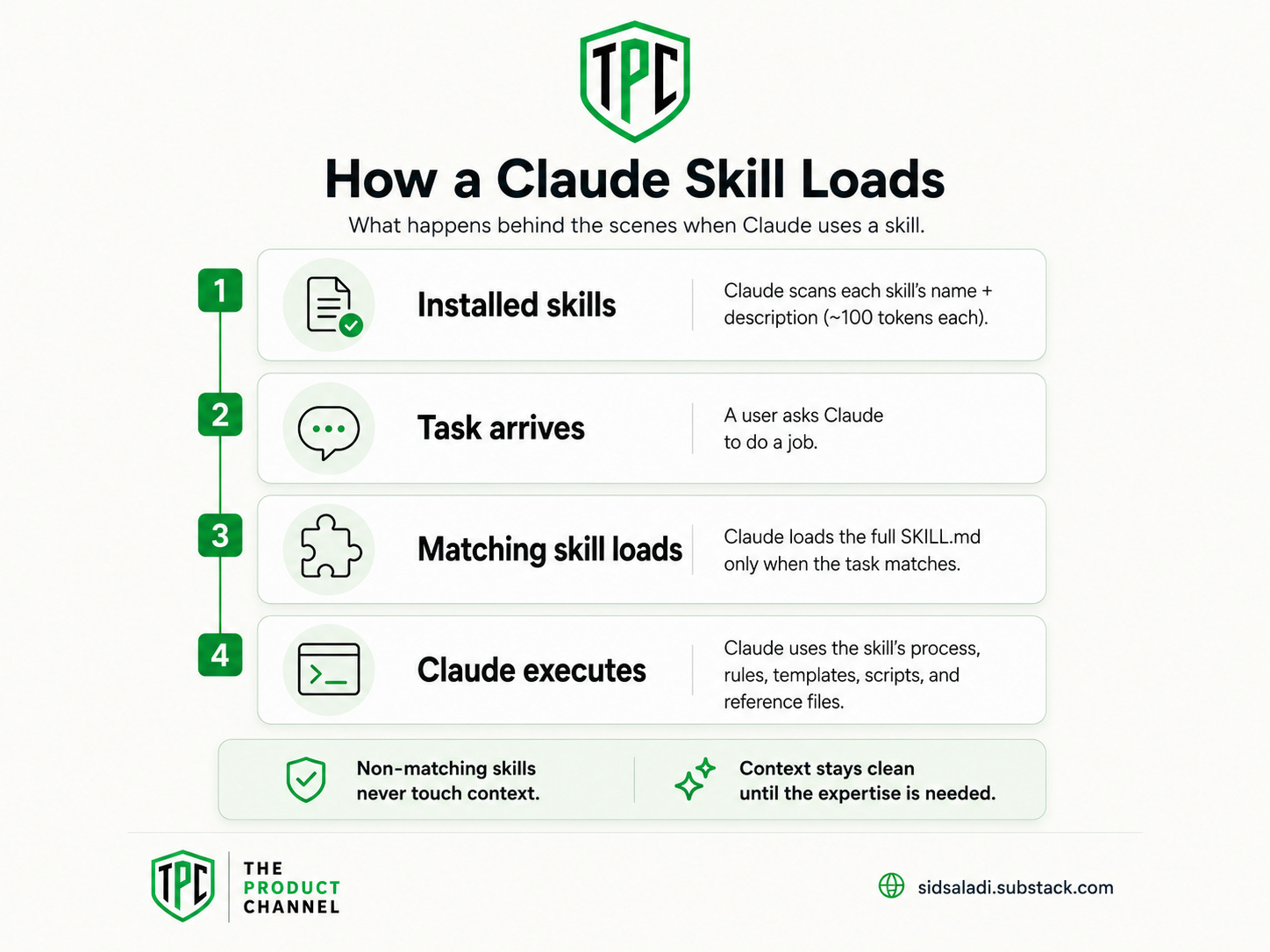
Inside the folder: a SKILL.md file with the expertise (the process, the rules, the quality bar), plus optional scripts, templates, and reference files. Per Anthropic's docs, Claude scans your installed skills at startup and reads only each one's name and description — about 100 tokens per skill — then loads the full instructions only when a task matches. Your context stays clean until the moment the expertise is needed.
Anthropic's own team splits skills into two types, and it's the most useful mental model in this whole space (Lessons from building Claude Code):
Capability Uplift — the skill teaches Claude something it can't do reliably on its own. For example: producing real PDF and Excel files, scraping the live web, testing an app in an actual browser.
Encoded Preference — Claude could do the task, but the skill encodes your exact way of doing it. Your PRD template. Your code-review checklist. Your resume doctrine.
Here's a concrete example of the difference. Ask stock Claude to "review this code" and you get generic feedback — competent, unopinionated, different every time. Install a review skill that encodes your checklist (security first, then tests, then naming; block on missing error handling) and every review runs that exact gauntlet, every time, without you re-explaining it.
That consistency is the product. Prompts are one-off instructions; skills are instructions that persist.
The 20 skills below cover both types. The Capability Uplift ones make Claude stronger; the Encoded Preference ones make it yours.
Getting Started — Setup in 5 Minutes
There are three ways to get Skills running. I’ll walk through all of them.
Path 1: Claude.ai (Web/App)
This is the easiest path. No terminal, no code.
Step 1: Enable Code Execution
Go to Settings > Capabilities and make sure Code Execution is turned on. Skills require this.
Step 2: Open the Skills Panel
Click Customize in the left sidebar, then select Skills. You’ll see any Skills you already have installed.
Step 3: Install a Skill
Click the “+” button. You can browse the marketplace or upload a ZIP file.
ZIP packaging rule: Your files must be inside a subfolder within the ZIP, not at the root level. So the structure should be:
my-skill.zip
  └── my-skill/
       └── SKILL.md
Not:
my-skill.zip
  └── SKILL.md    ← This won't work
That’s it for claude.ai. Your Skill is now active.
Path 2: Claude Code (Terminal)
If you use Claude Code, Skills are even more powerful because they can auto-activate based on file patterns and integrate with your development workflow.
Step 1: Create the Skills Directory
mkdir -p .claude/skills/my-skill-name
Step 2: Create Your SKILL.md
touch .claude/skills/my-skill-name/SKILL.md
Step 3: Write Your Instructions
Open the file and add your YAML frontmatter + instructions:
---
name: my-skill-name
description: Clear description of what this skill does and when to use it
---

# Your instructions here
That’s it. Claude Code automatically detects Skills in the .claude/skills/ directory.
Path 3: Through Conversation (The Lazy Way)
This is my favorite method. Just tell Claude what you want.
I want to create a Skill that formats all my code reviews
with these sections: Summary, Critical Issues, Suggestions,
and Praise. It should focus on readability and always check
for error handling. Save it as a SKILL.md file.
Claude will generate a properly structured SKILL.md file, create the folder, and save it. No coding required. You describe your workflow in plain English and Claude builds the Skill for you.
Where Skills Live (4 Locations)
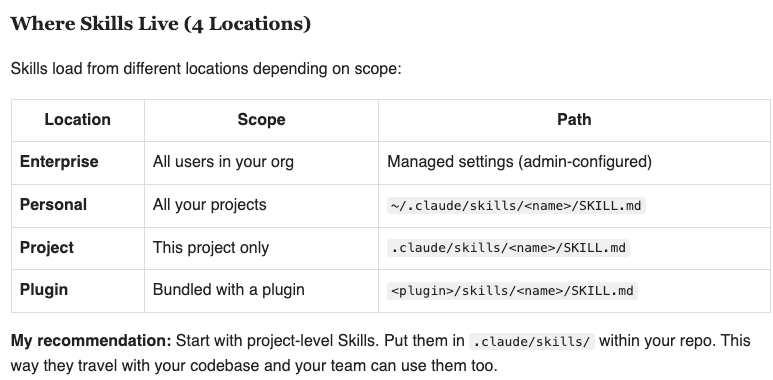
My recommendation: Start with project-level Skills. Put them in .claude/skills/ within your repo. This way they travel with your codebase and your team can use them too.
Skills vs Plugins vs MCP vs Subagents (Untangled)
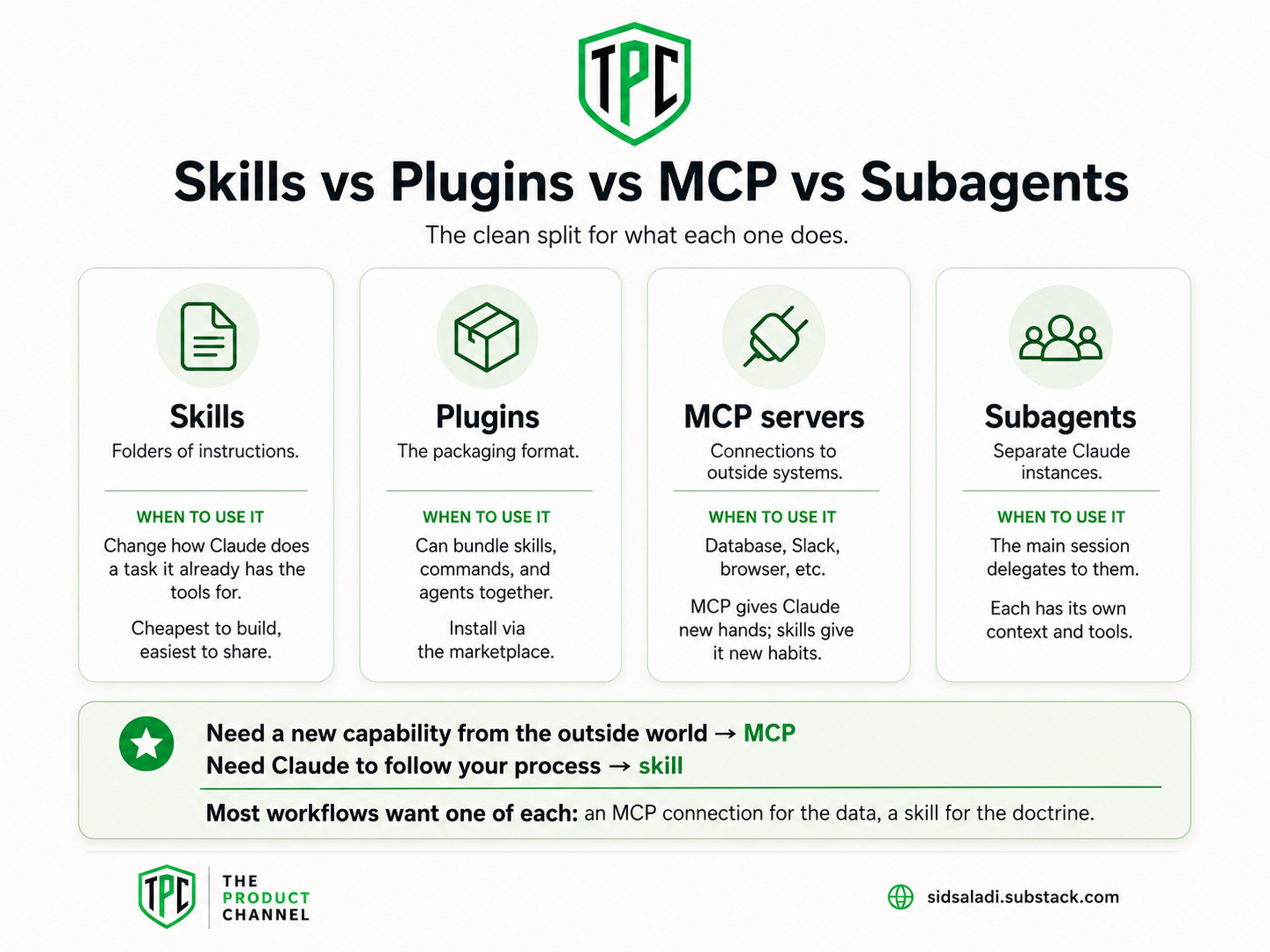
Four words that confuse everyone in their first week. Here's the clean split:
Skills — folders of instructions. They change how Claude does a task it already has the tools for. Cheapest to build, easiest to share. (This article.)
Plugins — the packaging format. A plugin can bundle skills, commands, and agents together and install via the marketplace. Think "app store wrapper."
MCP servers — connections to outside systems (your database, Slack, a browser). MCP gives Claude new hands; skills give it new habits.
Subagents — separate Claude instances your main session delegates to, each with its own context and tools. For example, a review subagent that checks the main agent's work.
The rule of thumb I give every reader: need a new capability from the outside world → MCP. Need Claude to follow your process → skill. Most workflows want one of each: an MCP connection for the data, a skill for the doctrine. My Claude Code Agents 101 guide covers the subagent side in depth.
How I Ranked These 20
Simple, honest criteria:
Weekly usefulness — would a normal knowledge worker, PM, builder, or job seeker actually run this every week? No novelty demos.
Tested, not aggregated — I built 12 of these myself (they're live in my library with real install counts and real subscriber data behind them). The community picks are ones I've run in my own sessions, credited to their sources.
Immediate value — install → first useful output in under ten minutes.
Ranked #1–20, grouped by persona. Let's go.
Keep reading with a 7-day free trial
Subscribe to The Product Channel By Sid Saladi to keep reading this post and get 7 days of free access to the full post archives.