
The Complete AI Financial Modeling Playbook: DCF, M&A, and 60 Claude Prompts (for Anyone, Not Just Finance Pros)
A playbook for founders, operators, PMs, analysts, and anyone who's ever stared at a blank Excel sheet and wished it would build itself.


You don’t need to be a finance person to build a good financial model.
You just need to know what questions to ask — and have an AI that can do the work for you while you ask them.
This is the guide I wish I had three years ago, when I was modeling startup revenue scenarios at 11pm and Googling “WACC formula” for the fifth time that week. Today, with Claude and a copy-paste prompt library, you can ship a credible DCF, M&A model, or unit economics dashboard before lunch.
Below is everything: the setup, the workflow, 60 prompts organized by who you are and what you need, and the templates that turn this into a real system you’ll actually use.
The Product Channel by Sid Saladi is a reader-supported publication. To receive new posts and support my work, consider becoming a free or paid subscriber.
The Truth About How Most People Build Financial Models
Let me tell you a truth.
Most financial models are bad. Not because the people building them are bad — but because the process is broken.
You open a blank workbook. You stare at it. You copy a template from a friend that looks more like a Rube Goldberg machine than a model. You break a formula. You spend 40 minutes finding the broken cell. You email the file to someone who immediately points out a flaw you can’t unsee.
This isn’t a finance problem. It’s a workflow problem.
The people who model fastest aren’t the ones who memorized every Excel function. They’re the ones who think clearly about drivers, scenarios, and outputs — and have a tool that handles the math.
That tool is now an AI like Claude. The math is no longer the bottleneck. Your thinking is.
This playbook is built around that idea: you bring the questions, Claude builds the model.
What Is “AI Financial Modeling” (And Why Should You Care?)
AI financial modeling isn’t about replacing Excel. It’s about replacing the busywork in Excel.
Here’s the practical definition: you describe what you want to model — a startup runway forecast, a SaaS unit economics breakdown, a discounted cash flow valuation, a leveraged buyout, a merger model — and Claude generates the structure, formulas, assumptions table, sensitivity analysis, and commentary.
You review. You push back. You ask “what if the churn is 6% instead of 4%?” Claude updates. You drop it into Excel or Google Sheets.
What it does well:
Translates your plain-English business question into a model structure
Generates formulas with cell references that actually work
Builds sensitivity tables and scenario analyses
Writes the executive summary explaining what the model says
Catches inconsistencies (e.g., your gross margin assumption doesn’t match your COGS line)
What it doesn’t do well (yet):
Live-link to your accounting system (you still paste in actuals)
Build complex circular references with iterative calculation gracefully
Replace the judgment call on which assumptions matter most
The combination — your judgment + Claude’s speed — is the unlock.
Why this matters now: Claude 4.7 (released late 2025) handles structured numerical reasoning at a level that wasn’t possible 18 months ago. Combined with the new “Artifacts” view, you can iterate on a model in conversation and see it update live. The 1M context window means you can paste your entire P&L history and Claude holds it all.
Getting Started: Setup in 10 Minutes
You need three things. None of them are expensive.
1. A Claude account. Free tier works for getting started. For serious modeling, the $20/month Pro plan gives you Claude Opus 4.7, which is the one you want for finance. You can sign up at claude.ai.
2. Google Sheets or Excel. Either works. I prefer Google Sheets for collaborative modeling and Excel for anything that needs to look polished for an investor or board. Claude can generate output for either.
3. A “model workspace” project in Claude. This is the under-used trick. Open Claude, create a new Project, name it “Financial Models,” and paste your standard context in once: your company stage, business model, key metrics, and any historical numbers. Every future conversation in this Project remembers all of it.
That’s it. Setup time: 10 minutes. Recurring time: zero.
A few setup notes worth knowing:
Use Claude Opus, not Sonnet, for finance work. Sonnet is faster but Opus is meaningfully better at multi-step numerical reasoning.
Turn on Extended Thinking for valuation work. The output quality difference is large.
Use Artifacts. When you ask Claude to build a model, ask it to put the output in an Artifact — that gives you a live, editable view you can iterate on without losing the conversation.
If you’re brand new to Claude as a workspace, my Claude Projects & Artifacts 101 covers the foundations in 15 minutes.
Core Features Walkthrough: The 6 Things You’ll Use Every Time
These six capabilities cover 95% of financial modeling workflows.
1. Structured model generation. You describe the business in 5 sentences. Claude returns a full model skeleton — revenue build, cost structure, working capital, capex, financing — in Excel-ready format.
2. Formula explanation and audit. You paste a formula or screenshot a cell. Claude tells you what it does, whether it’s correct, and where it might break.
3. Sensitivity and scenario analysis. You give Claude the base case. It generates the bear, bull, and stress cases, plus a tornado chart of which assumptions matter most.
4. Valuation methods. DCF, comparables, precedent transactions, LBO, sum-of-the-parts, dividend discount. You name the company and the method. Claude builds it.
5. Executive narrative. Every good model is paired with a one-page memo explaining what it says. Claude writes the memo from the model in 30 seconds.
6. Excel/Sheets export. Claude returns clean formulas with cell references (B5*B6, etc.) that you paste directly into your workbook. No “this is just an example” hedging.
Use these in sequence and a complete model takes 60–90 minutes. The same model used to take a junior banker a full weekend.
🔒 Want all 60 prompts ?
How to Use This Playbook
Every prompt below is copy-paste ready and battle-tested. They follow a simple structure:
When to use it — the scenario that triggers this prompt
Why it works — what makes the prompt effective
The prompt itself — in a code block, with
[BRACKETS]for your customizationsPro tip — one extra move to get more out of it
Customize the bracketed parts to your business. Run them in a Claude Project where you’ve already provided context — they get sharper every time.
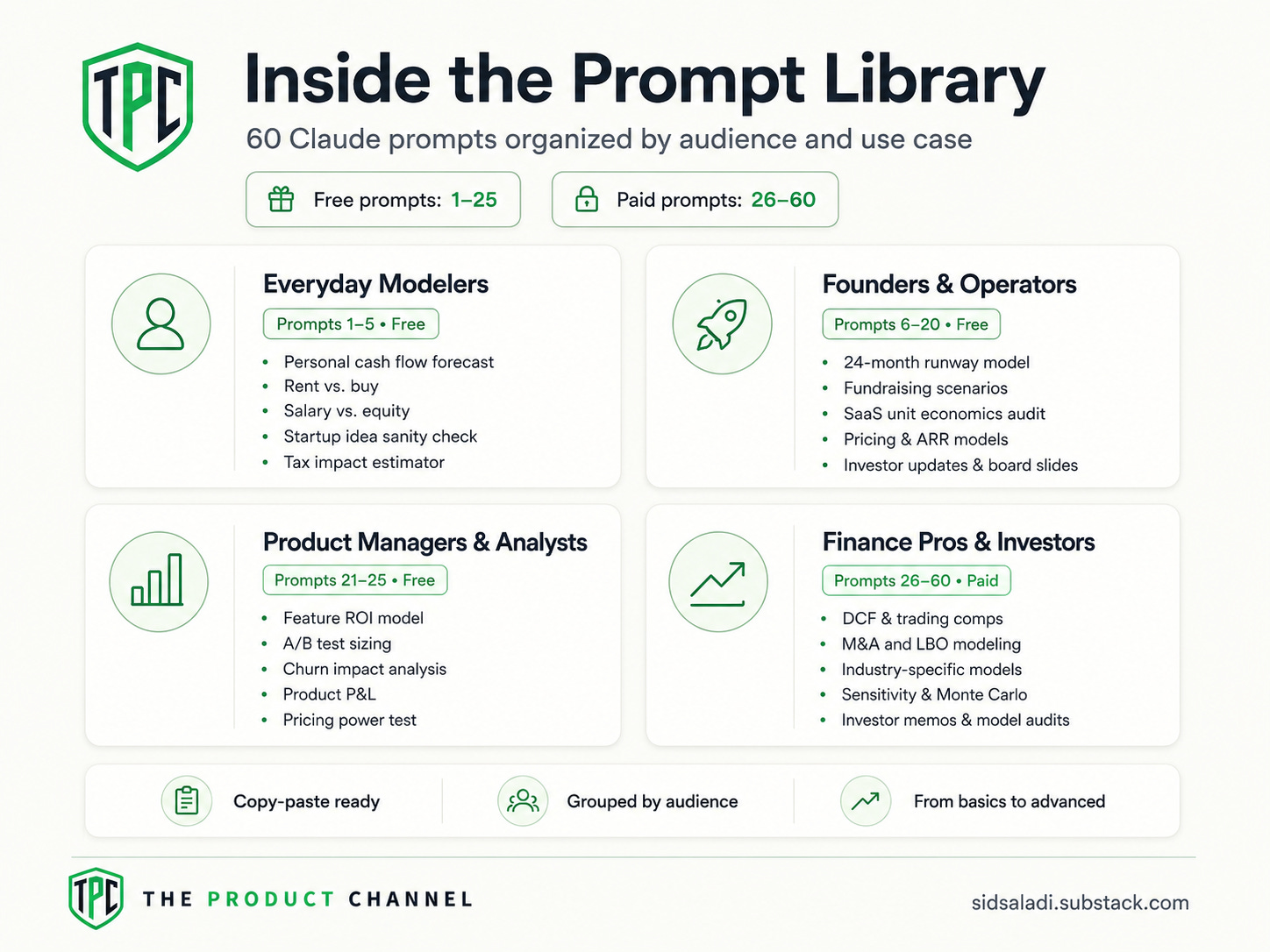
The 60 prompts are organized by who you are:
🧑💻 Anyone modeling for the first time (10 prompts)
🚀 Founders & operators (15 prompts)
📊 Product managers & analysts (5 prompts)
💼 Finance pros & investors (30 prompts)
═══ 🧑💻 FOR EVERYDAY MODELERS: The Basics ═══
You’re not a finance person. You just need to model something — a side project’s economics, a salary negotiation, a should-I-buy-this-house question. These prompts make it easy.
Category A: Personal & Side Project Modeling
Prompt 1: Build a personal cash flow forecast — You want to know if you can afford to leave your job, or how long your savings last at current burn.
I want to model my personal cash flow for the next [24] months. Here's my situation:
- Current savings: $[AMOUNT]
- Monthly take-home income: $[AMOUNT]
- Fixed monthly expenses (rent, utilities, insurance, subscriptions): $[AMOUNT]
- Variable monthly expenses (food, entertainment, etc.): $[AMOUNT]
- One-time expected income or expenses in the next 24 months: [LIST WITH MONTH]
Build a month-by-month cash flow model in a clean table. Include:
- Starting balance, income, expenses, ending balance for each month
- A row showing "months of runway remaining" if income drops to zero
- A summary at the bottom showing total saved/spent over 24 months
- 3 sensitivity scenarios: income drops 20%, expenses rise 15%, both
Format the output so I can paste it into Google Sheets.
👉 Save this prompt to your library on GetPrompts →
💡 Pro tip: Ask Claude to add a “what would need to change for me to save an extra $1,000/month?” follow-up. The answer is more useful than the model itself.
Prompt 2: Should I buy or rent? — You’re deciding between buying a home or renting in the same area.
Build me a rent vs. buy decision model for the next [10] years.
Buy scenario:
- Home price: $[AMOUNT]
- Down payment: [%]
- Mortgage rate: [%]
- Property tax rate: [%]
- HOA / maintenance: $[AMOUNT]/year
- Expected home appreciation: [%]/year
Rent scenario:
- Current rent: $[AMOUNT]/month
- Annual rent increase: [%]
- Renter's insurance: $[AMOUNT]/year
Opportunity cost: assume any money NOT spent on the home goes into an index fund returning [7]% annually.
Output a year-by-year comparison showing net wealth in each scenario, including:
- Home equity (buy case)
- Investment portfolio value (rent case)
- A break-even year if one exists
- A clear "which is better" answer with the dollar gap at year 10
Show me the formulas you used.
👉 Save this prompt to your library on GetPrompts →
💡 Pro tip: Re-run with mortgage rates +1% and -1% to see how rate-sensitive your decision is. Most people don’t realize how big this swing is.
Prompt 3: Should I take the salary or the equity? — A startup offers you a job with a salary/equity trade-off.
Keep reading with a 7-day free trial
Subscribe to The Product Channel By Sid Saladi to keep reading this post and get 7 days of free access to the full post archives.