
OpenAI Codex 101: The Complete Guide to AI Coding Agents with 33 Ready-to-Use Prompts

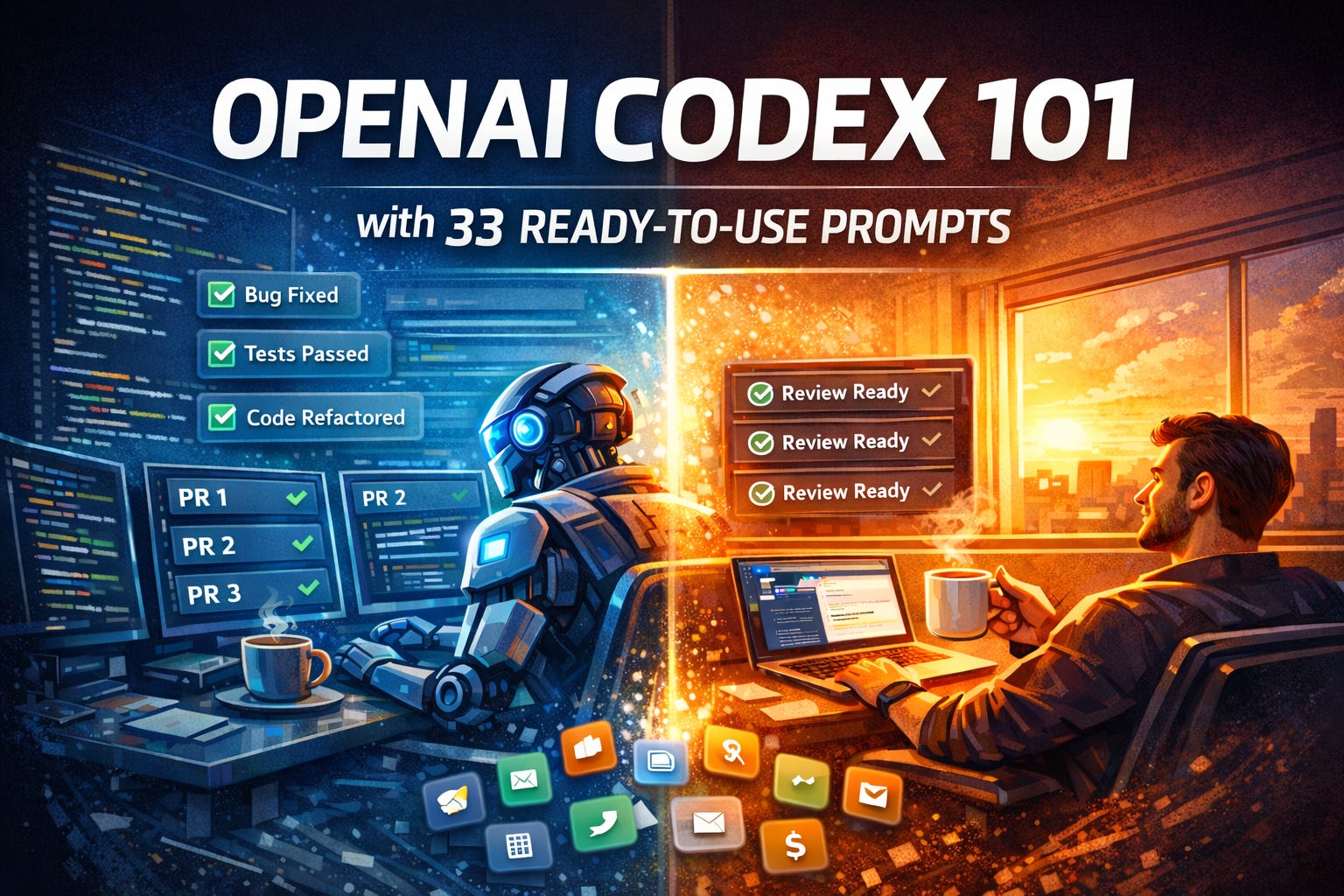
Now I delegate all of that to Codex before my first cup of coffee. By the time I sit down, three pull requests are waiting for my review. That’s not a productivity hack. That’s a fundamentally different way to build software.
PART 1: THE 101 GUIDE
🔍 The Truth About How You’re Coding Right Now
Let me paint a picture you’ll recognize.
You sit down to build a feature. You open your editor. You write 30 lines of code. You hit a bug. You Google it. You open Stack Overflow. You scroll past three outdated answers. You find one that might work. You copy-paste it. It doesn’t work. You tweak it. It kind of works. You spend another 20 minutes writing tests.
That was 90 minutes for 30 lines of code.
Meanwhile, the real work — designing the feature, thinking through edge cases, deciding what to ship — that’s stuck in your backlog while you’re playing whack-a-mole with syntax errors.
Now multiply that across every developer on your team. Every day.
This is the old world. The world where humans do all the mechanical work AND the thinking work. Where a senior engineer spends 60% of their time on tasks that don’t require senior-level thinking.
Here’s where OpenAI Codex changes the equation entirely.
🤖 What Is Codex (And Why Should You Care?)
Codex is OpenAI’s AI coding agent. Not an autocomplete tool. Not a chatbot that writes code snippets. An agent that can independently work on your codebase for minutes or hours at a time.
Think of it like this: GitHub Copilot is a spell-checker for code. Codex is a junior developer who never sleeps.
Here’s what Codex actually does:
Writes features end-to-end — describe what you want, it writes the code, runs tests, and creates a pull request
Debugs and fixes bugs — paste an error, it traces the failure, finds the root cause, and patches it
Refactors large codebases — rename variables across 200 files, migrate frameworks, clean up tech debt
Reviews code — catches bugs, suggests improvements, flags security issues before they ship
Runs in parallel — assign 5 tasks to 5 agents at once, all working simultaneously on your codebase
Automates recurring work — set up scheduled tasks like issue triage, CI failure analysis, and release notes
Codex is powered by GPT-5.3-Codex (the latest model as of February 2026), which is specifically trained for software engineering tasks using reinforcement learning on real-world coding projects.
The numbers that matter:
Over 1 million developers have used Codex since its May 2025 launch
Tasks typically complete in 1–30 minutes depending on complexity
GPT-5-Codex has worked independently for 7+ hours on complex tasks
Available on macOS app, CLI, IDE extension, and web — all synced through your ChatGPT account
For the full context on how AI is changing development workflows, check out my Claude Code 101 Guide: 150+ Use Cases for a comparison of how different AI coding agents approach the same problems.
🚀 Master AI in 2026: The Complete 101 Library
Claude (Anthropic)
Perplexity AI
ChatGPT (OpenAI)
Prompt Engineering & Skills
📚 AI Tool 101 Guides — By Use Case
🔍 Research & Search
💰 Financial Analysis & Modeling
🛠️ Productivity & Automation
🌐 AI Browsers
🎯 PM Skills
⚡ Getting Started: From Zero to First Task in 10 Minutes
Here’s every way to access Codex — pick whichever fits your workflow.
Option 1: Codex Web (Easiest Start)
Go to chatgpt.com/codex
Sign in with your ChatGPT account
Connect your GitHub repository
Type a task → click “Code”
Watch it work in real time
Option 2: Codex CLI (Power Users)
# Install via npm
npm i -g @openai/codex

# Or via Homebrew on Mac
brew install --cask codex

# Launch and sign in
codex
# Select "Sign in with ChatGPT"
Option 3: Codex App for macOS (Launched February 2, 2026)
Download from openai.com/codex
Available on macOS (Apple Silicon) — Windows alpha testing is underway
Sign in with your ChatGPT account or API key
This is the full command center: multi-agent, parallel tasks, automations, and git worktrees built in
Option 4: IDE Extension
Available for VS Code, Cursor, and Windsurf
Install from your IDE’s extension marketplace
Works alongside your existing coding workflow
Pricing: What You Actually Pay
Codex is bundled with ChatGPT — there’s no separate subscription.
Plan Price What You Get Free / Go $0 Limited Codex access (for a limited time) Plus $20/month Solid daily usage — enough for most individual developers Pro $200/month Heavy daily usage — full-time development teams Business Custom Team features, no data training by default Enterprise Custom Full security, SCIM, EKM, audit logs
Pro tip: If you hit your usage limits on Plus, you can switch to the GPT-5.1-Codex-Mini model for up to 4x more usage on routine tasks. Save the big model for complex work.
Common Setup Issues (Quick Fixes)
CLI can’t find packages: Add dependencies to your setup script in the Codex environment configuration
Tests fail in cloud: Codex runs without internet access by default. Mock all external API calls
GitHub not connecting: Make sure you’ve authorized the OpenAI GitHub integration in your repo settings
🛠️ Core Features Walkthrough
1. Task Delegation (The Foundation)
Type a natural language prompt → Codex writes code, runs tests, and produces a diff. You review and merge.
How to access: Type your task in any Codex surface (web, app, CLI, IDE) and hit enter.
When to use: Any well-scoped coding task — feature implementation, bug fix, test writing, refactoring.
2. AGENTS.md (Your Project’s AI Rulebook)
This is the most important file you’ll create. It tells Codex how your project works — what commands to run, what standards to follow, what to avoid.
# AGENTS.md

## Project Overview
This is a Next.js 14 app with TypeScript and Tailwind CSS.

## Commands
- Run tests: `npm test`
- Lint: `npm run lint`
- Build: `npm run build`

## Conventions
- Use functional components with hooks
- All API routes go in /app/api/
- Write tests for every new function
- Use Zod for input validation
Drop this in your repo root. Codex reads it before every task.
3. Skills (Reusable Workflows)
Skills extend Codex beyond code. They’re bundles of instructions + scripts that teach Codex new capabilities.
Built-in skills include:
$skill-creator — create new skills
$skill-installer — install community skills
Figma skill — converts designs to production UI code
Linear skill — triage bugs, track releases, manage workload
Deployment skills — push to Cloudflare, Netlify, Vercel, Render
How to invoke: Type $skill-name in your prompt, or let Codex auto-detect the right skill.
4. Automations (Scheduled Background Tasks)
Set Codex to run recurring tasks on a schedule — no prompting needed.
Use cases teams are running right now:
Daily issue triage at 8am
CI failure analysis after every failed build
Release notes generation every Friday
Automated bug detection on recent commits
Test coverage scanning weekly
Results land in a review queue. You check them when you’re ready.
5. Multi-Agent Parallel Workflows (Codex App)
The Codex app lets you run multiple agents simultaneously on different tasks, each in its own isolated environment.
Example: While Agent 1 builds a new API endpoint, Agent 2 writes tests for an existing feature, and Agent 3 refactors the database layer. All running at the same time, on the same codebase, without conflicts.
Each agent works on its own git worktree — so there’s zero risk of changes colliding.
6. Code Review via GitHub
Tag @Codex in any pull request on GitHub. It reviews the code, catches bugs, flags security issues, and suggests improvements — automatically.
⚔️ Codex vs. Claude Code: Which AI Coding Agent Should You Actually Use?
If you’ve been following The Product Channel, you know I’ve covered Claude Code extensively — from the Claude Code 101 Guide: 150+ Use Cases to the Claude Projects & Artifacts 101 deep dive.
So the obvious question: how does Codex compare to Claude Code?
Short answer: they’re built on fundamentally different philosophies. Both can access your file system, read your repo, write code, and run commands. But how they do it — and where they shine — is night and day.
Let me break it down honestly.
The Core Philosophy Difference
Codex = “Move fast, delegate, iterate.” It’s built for parallel task delegation. You assign work to agents, they run independently in the cloud, and you review the output. Think of it like managing a team of junior developers.
Claude Code = “Measure twice, cut once.” It’s built for deep, interactive collaboration. You work with it in real-time, it asks clarifying questions, and you co-create together in your terminal. Think of it like pair programming with a senior engineer.
Neither approach is “better.” They’re optimized for different workflows.
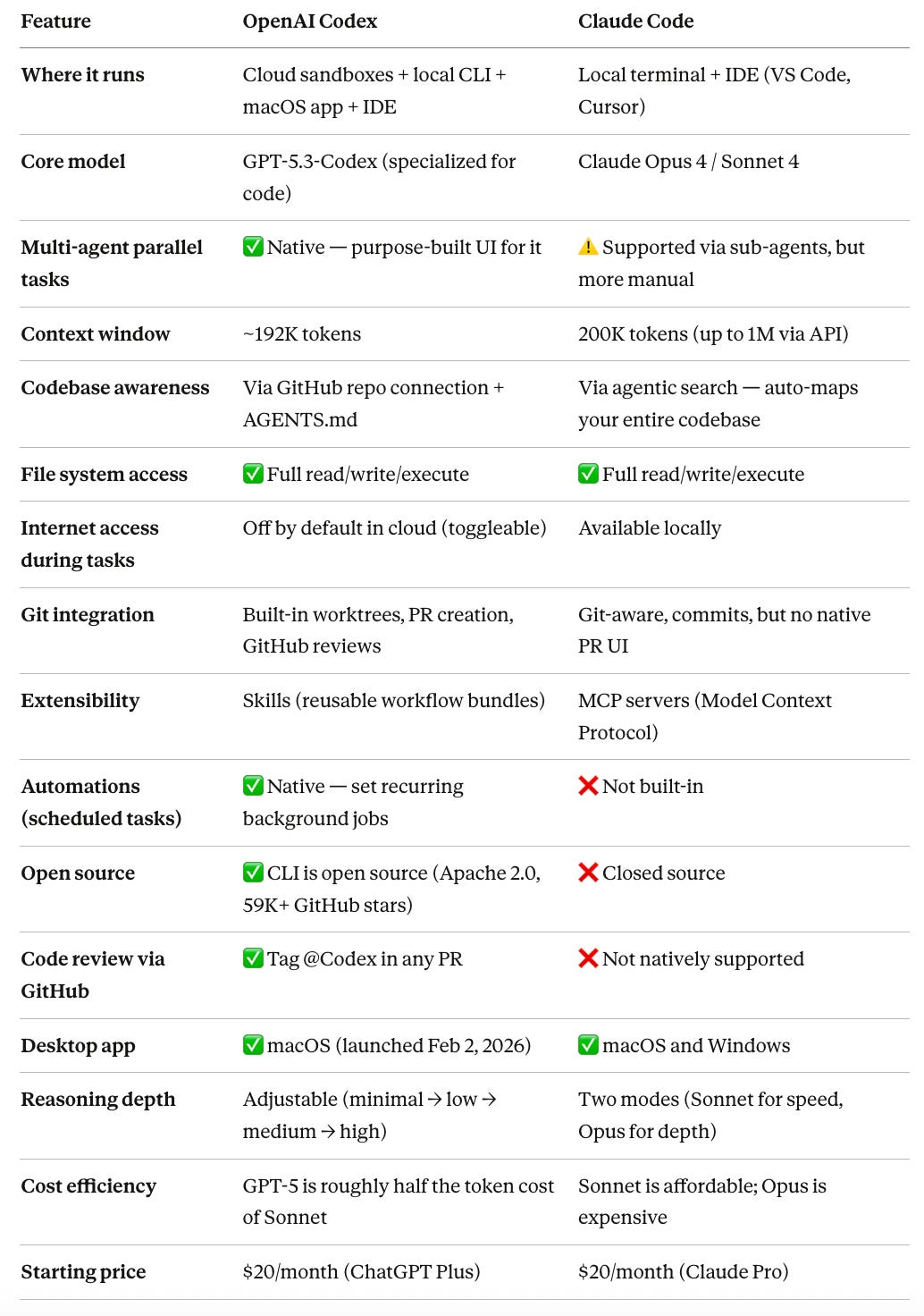
The Head-to-Head Comparison
Here’s how they stack up across the features that actually matter:
Where Codex Wins
1. Parallel task execution. This is Codex’s killer feature. Assign 5 different tasks, each runs in its own isolated container, and you review all 5 when they’re done. Claude Code can do parallel work, but Codex was designed around it. The app UI, the worktree management, the review queue — it’s all built for delegation at scale.
2. Scheduled automations. Codex can run recurring tasks on a schedule without you prompting it. Daily issue triage. Weekly test coverage scans. Friday release notes. Claude Code doesn’t have an equivalent. This alone is worth the switch for teams drowning in operational toil.
3. GitHub-native code review. Tag @Codex in a pull request, and it reviews the code, flags issues, and suggests fixes — right inside GitHub. No extra setup. Claude Code doesn’t offer this natively.
4. Customizable reasoning levels. Codex lets you dial reasoning up or down depending on the task. Quick rename? Use minimal reasoning. Complex refactor? Crank it to high. Claude Code gives you Sonnet (fast) or Opus (deep), but less granularity between.
Where Claude Code Wins
1. Deep, interactive reasoning. For genuinely complex tasks — untangling legacy systems, debugging hairy race conditions, architectural decisions — Claude Code tends to produce more thoughtful, step-by-step output. It asks clarifying questions before writing code. Codex tends to just go. That speed is great for simple tasks, but for high-stakes work, Claude’s deliberate approach catches edge cases Codex might miss.
2. Larger context window. Claude’s 200K token window (up to 1M via API) means it can hold more of your codebase in memory at once. For massive monorepos, this matters. Codex’s ~192K is close but not quite there.
3. Local-first privacy. Claude Code runs on your machine by default. Your code stays on your hardware. Codex’s cloud mode sends code to OpenAI’s servers (even though it’s sandboxed and isolated). For teams with strict security requirements, Claude’s local-first approach may be non-negotiable.
4. MCP ecosystem. Claude Code’s support for Model Context Protocol servers gives it broad extensibility — connecting to databases, APIs, file systems, and third-party services. Codex has Skills (which are powerful), but MCP’s ecosystem is currently more mature and flexible.
5. Token efficiency on complex tasks. In real-world tests, Codex tends to use fewer tokens for straightforward tasks but Claude Code can be more efficient on multi-step, reasoning-heavy work where getting it right the first time matters more than speed.
My Honest Recommendation
Here’s how I’d decide:
Choose Codex if:
You want to delegate multiple tasks and review the output
You need scheduled automations (CI triage, release notes, recurring scans)
Your team is already deep in the GitHub/ChatGPT ecosystem
You prefer async workflows — assign work, come back later
You’re a solo developer or small team wanting to “multiply yourself”
Choose Claude Code if:
You want real-time pair programming with deep reasoning
You’re working on complex architecture or debugging hairy problems
Privacy is critical — you want everything running locally
You need the largest possible context window for massive codebases
You prefer interactive, iterative collaboration over delegation
The power move? Use both. Design architecture and investigate complex bugs with Claude Code. Delegate implementation, tests, refactoring, and operational tasks to Codex. Many developers are finding this hybrid approach gives them the best of both worlds.
If you haven’t explored Claude Code yet, start with my Claude Code 101 Guide: 150+ Use Cases — it’s a complete walkthrough with copy-paste prompts, just like this guide. And if you want to go deeper on Claude’s broader ecosystem, my Claude Projects & Artifacts 101 covers how to set up persistent project contexts that supercharge any Claude workflow.
PART 2: THE PROMPT & USE CASE PLAYBOOK
📋 How to Use This Playbook
Every prompt below is Codex-specific — meaning it leverages capabilities unique to Codex: parallel agents, AGENTS.md, cloud sandboxes, automations, Skills, GitHub integration, and multi-file codebase access.
These aren’t generic “ask any chatbot” prompts. They’re designed for the workflows that make Codex different.
Replace anything in [BRACKETS] with your specifics. Each prompt notes which Codex surface works best: Cloud (web), CLI, App (macOS), or All.
I’ve sourced these from my own testing, developer community favorites (credited where applicable), and real practitioner workflows shared on Reddit, X, and LinkedIn.
🔥 VIRAL COMMUNITY BUILDS: What People Are Actually Building With Codex
Before we dive into prompts, let’s look at what the community has actually shipped with Codex. These aren’t hypotheticals — they’re real projects that went viral.
🦞 OpenClaw — The Fastest-Growing GitHub Repo in History
Peter Steinberger built OpenClaw (formerly Clawdbot), an open-source AI agent framework, almost entirely with Codex. The project exploded to 180,000+ GitHub stars and had more Google searches than Claude Code and Codex combined.
Steinberger — who previously sold PSPDFKit for over $100M — said his productivity roughly doubled after switching to Codex. He described himself as “the biggest unpaid promoter for Codex” and received acquisition offers from both OpenAI and Meta.
His approach? Default to Codex for coding tasks. Use parallel agents for different features. Let AGENTS.md enforce consistency across sessions.
“Consider how Codex sees your codebase. They start a new session and know nothing about your project. So you gotta help those agents a little bit.” — Peter Steinberger on Lex Fridman Podcast #491
Why this matters for you: If a single developer can build the fastest-growing GitHub project with Codex, imagine what it can do for your team’s output.
📱 Sora Android App — 4 Engineers, 28 Days, 85% AI-Generated Code
OpenAI’s own team used Codex to build the Sora Android app from prototype to #1 on Google Play in 28 days. Four engineers. ~5 billion tokens. 99.9% crash-free at launch. Over 1 million videos generated in the first 24 hours.
The key insight? They treated Codex like “a newly hired senior engineer” — not a tool to configure, but a teammate to onboard. They wrote example code templates first, used AGENTS.md files throughout the codebase, and let Codex handle implementation while humans owned architecture.
One engineer (RJ Marsan) shattered his wrist during the sprint and couldn’t type. He switched to speech-to-text, talking to Codex instead of typing. That forced constraint taught the whole team something: describing what you want produces better results than trying to micromanage the output.
Their quote that stuck with me:
“Forget React Native or Flutter — the future of cross-platform is just Codex.”
They pointed Codex at the iOS codebase and had it translate Swift logic into Kotlin, preserving behavior. No shared framework needed.
🏎️ The Racing Game — 7 Million Tokens, One Prompt
At the Codex App launch, OpenAI demoed building an entire racing game from a single prompt. Codex used the image generation skill (GPT Image) and a web game development skill, then worked independently — designing, coding, and QA testing by actually playing the game itself.
Eight maps. Multiple racers. Power-up items. All from one instruction. This is the kind of task that shows Codex’s unique strength: long-horizon, multi-step work where it plans, builds, tests, and iterates without you hovering.
🎬 DevDay 2025 — Codex Built the Conference
OpenAI used Codex to build everything for DevDay 2025 — from Romain Huet’s keynote demo (programmatically controlling cameras and stage lights) to the arcade machines in the community hall. Even the Guardrails SDKs for Python and TypeScript were polished using Codex, with one engineer ramping up on unfamiliar codebases and fixing bugs across multiple projects simultaneously.
🛠️ Enterprise Adoption
Major companies are already using Codex in production:
Cisco — exploring Codex for engineering teams to accelerate feature development
Virgin Atlantic — deployed AI agents internally for data analysis and customer engagement
Duolingo — piloting Codex for development workflows
Vanta — using Codex for security-related code tasks
Spotify — engineers shipping features via AI coding agents (using Claude Code, but the workflow pattern applies to both)
The pattern across all of them: delegate implementation, keep humans on architecture and review.
🧑💻 FOR EVERYDAY USERS & NON-DEVELOPERS
These prompts leverage Codex’s ability to build complete, working projects — not just give you code snippets. Codex runs your code in a sandbox, tests it, and delivers something functional.
1. Build a Complete Web App From a Description Best surface: Cloud / App
